Deploy in FIPS Mode
On this page
The National Institute of Standards and Technology (NIST) publishes Federal Information Processing Standards in the FIPS 140-3 document, which specifies security requirements for cryptographic operations. Deployments must store cryptographic keys in a FIPS-validated cryptographic module. Cryptographic algorithms for encryption, decryption, hashing, signing, and verification must use approved algorithms.
In regulated environments, organizations may need the Curity Identity Server to use FIPS-compliant cryptography. To enable that, Curity provides a FIPS docker image for the Curity Identity Server with a set of restricted, FIPS-compliant cryptographic methods. You can run this docker image in any container-based deployment.
This tutorial explains deployment and operational differences when you run the Curity Identity Server in FIPS mode.
Get a FIPS License
Running the Curity Identity Server in FIPS mode requires a dedicated license. Contact Curity sales to get a Curity Identity Server license that enables the use of the FIPS module. A user from your company can then get Docker credentials from the Curity Developer Portal Docker Images page. The user to deploy the Curity Identity Server can then log in to the Docker registry with those credentials and pull the Docker image.
docker login -u my-company-token -p <token> curityfips.azurecr.iodocker pull curityfips.azurecr.io/curity/idsvr:latest
Deploy to Docker in FIPS Mode
Once you have the FIPS docker image you can use it just like the default Docker image, and follow onboarding tutorials to deploy in your preferred ways, e.g. to Kubernetes. The following getting started deployment runs an initial deployment with the FIPS docker image.
ADMIN_PASSWORD=$(openssl rand -hex 16)echo "Admin password is: $ADMIN_PASSWORD"docker run -it \-e "PASSWORD=$ADMIN_PASSWORD" \-p 6749:6749 \-p 8443:8443 \curityfips.azurecr.io/curity/idsvr:latest
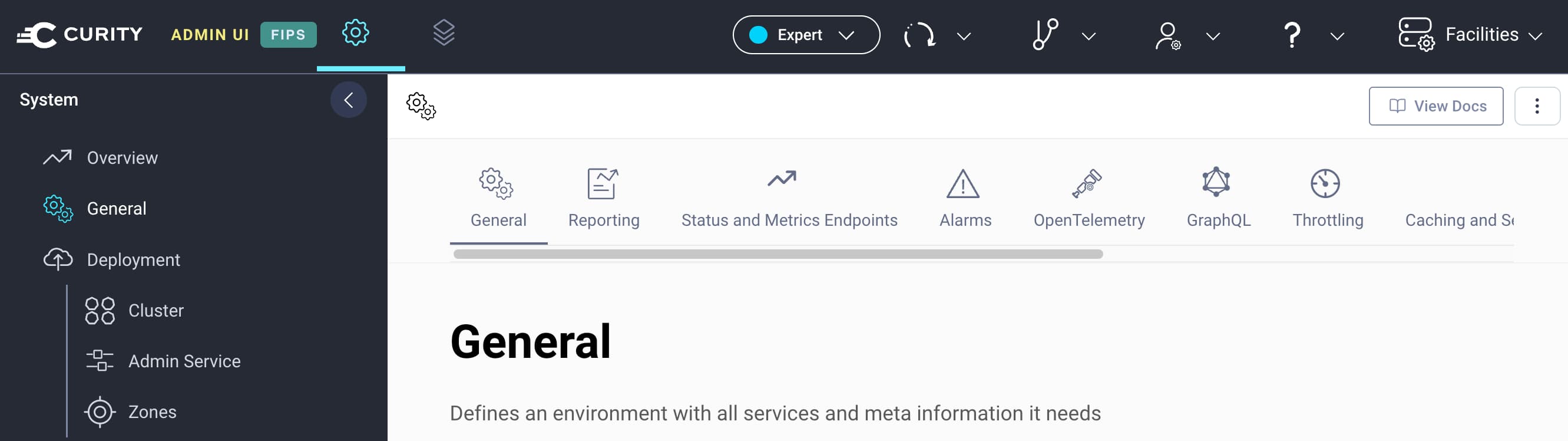
Once deployment completes, log in to the Admin UI, run the getting started wizard if required, and upload your license. An indicator in the top left hand corner of the Admin UI will show that the Curity Identity Server runs in FIPS mode.
The Curity Identity Server FIPS Docker GitHub repository contains the full resources for FIPS-compliant Docker images, which use the OpenSSL FIPS module.
Use FIPS-Compliant Cryptography
When you run the Curity Identity Server in FIPS mode, you must use FIPS-Approved Cryptography. Update any existing password hash algorithms or signing keys to meet the conditions that the docs explain, before changing to the FIPS docker image. Non-compliant configurations cause startup errors when the Curity Identity Server runs.
Use FIPS-Compliant Passwords
FIPS deployments typically use the PBKDF2 (Password-Based Key Derivation Function 2) hashing algorithm, which requires user and administrative passwords to be at least 112 bits (14 characters). If you configure the Curity Identity Server with password hashing algorithms based on SHA256 or SHA512, there is no minimum length requirement.
Client Secrets
The Curity Identity Server stores normal OAuth client secrets as SHA256 hashes, so they do not need to change if you migrate an existing deployment to use FIPS.
Some database providers, like PostgreSQL, Oracle and MongoDB, use passwords based on PBKDF2, so any passwords in database connections must be at least 14 characters. MySQL does not have a minimum password length requirement, but the connection must be updated to use TLS.
Deploy Crypto Assets
In real deployments you need to deploy secrets, including keystores and trust stores. For example, the Curity Identity Server uses a signing key to protect JWT access tokens. The Configuration as Code and Automate Certificate Renewal tutorials explain ways to deploy protected secrets.
In FIPS mode, you cannot use the convertks tool, which produces a PKCS#12 format that is not a FIPS-Compliant Keystore. When you use FIPS mode, export the private key using openssl instead of the convertks tool. The following example commands produce a valid keystore that you can reference as a parameter in Curity XML configuration. The Curity Identity Server loads the key and converts it to the required Bouncy Castle FIPS KeyStore (BCFKS) format.
SIGNING_KEY=$(openssl pkcs12 -in signing.p12 -nocerts -nodes -out /dev/stdout -passin pass:"$SIGNING_KEY_PASSWORD" \| awk '/-----BEGIN .*PRIVATE KEY-----/,/-----END .*PRIVATE KEY-----/')
Conclusion
The FIPS docker image for the Curity Identity Server enables deployments to regulated environments for high security use cases. To do so, you may need to follow the steps from this tutorial to migrate to FIPS-approved cryptography. You can continue to use all features of the Curity Identity Server, with a hardened security posture. Read much more about FIPS Compliance in the docs.
Customer Stories
Learn how organizations run identity and API security at scale.
Read customer storiesWas this helpful?