
On this page
Modern digital services rely on strong, seamless authentication. However, even the most robust authentication systems can depend on external components and integrations. If one of these services becomes unavailable, users may be unable to authenticate and use a service. This leads to frustration, loss of productivity, trust, and revenue.
A fallback authentication approach solves this challenge by making sure users can still authenticate through an alternate mechanism when a primary authentication method fails. This improves reliability, keeps the user journey intact and maintains access without compromising security. Instead of displaying an error page or forcing the user to try again later, the system provides an alternative mechanism to verifying the users identity.
This tutorial explains how to implement fallback authentication with the Curity Identity Server using a set of configurations. The concept is implemented in the fully prepared Authentication Fallback Demo GitHub repository.
Setting up the Authenticators
As described, implementing fallback authentication requires a primary and a secondary authenticator. In the demo environment, the following authenticators are used:
OIDC (Primary) - This authenticator is available as a service to the Curity Identity Server. It exposes an endpoint that is used to verify if the service is available or not. In a real world scenario this could be any type of external identity provider such as Google, EntraID, or a corporate identity system.
HTML Form with LDAP (Secondary) - This is the authenticator that the Curity Identity Server uses to failover to if the primary authenticator is unavailable. Technically this does not have to be a local authentication option but it is advisable. If the primary authentication option is unavailable due to some networking issue, then another external authentication service will likely also be unavailable.
Username Authenticator - To execute the authentication pipeline and determine which authenticator to invoke, the system uses a username authenticator. This authenticator captures the user’s username and then checks whether the service used by the primary authenticator is available.
Synchronized Credentials
For a fully seamless user experience, the system should synchronize the credentials used by the primary and fallback authenticators. For example, Entra ID can synchronize with a local Active Directory. This approach allows users to sign in with the same credentials regardless of the authentication method.
If the system does not synchronize credentials, it can instead inform the user that the primary authentication method is unavailable and offer the option to authenticate using the fallback method.
Authentication Pipeline
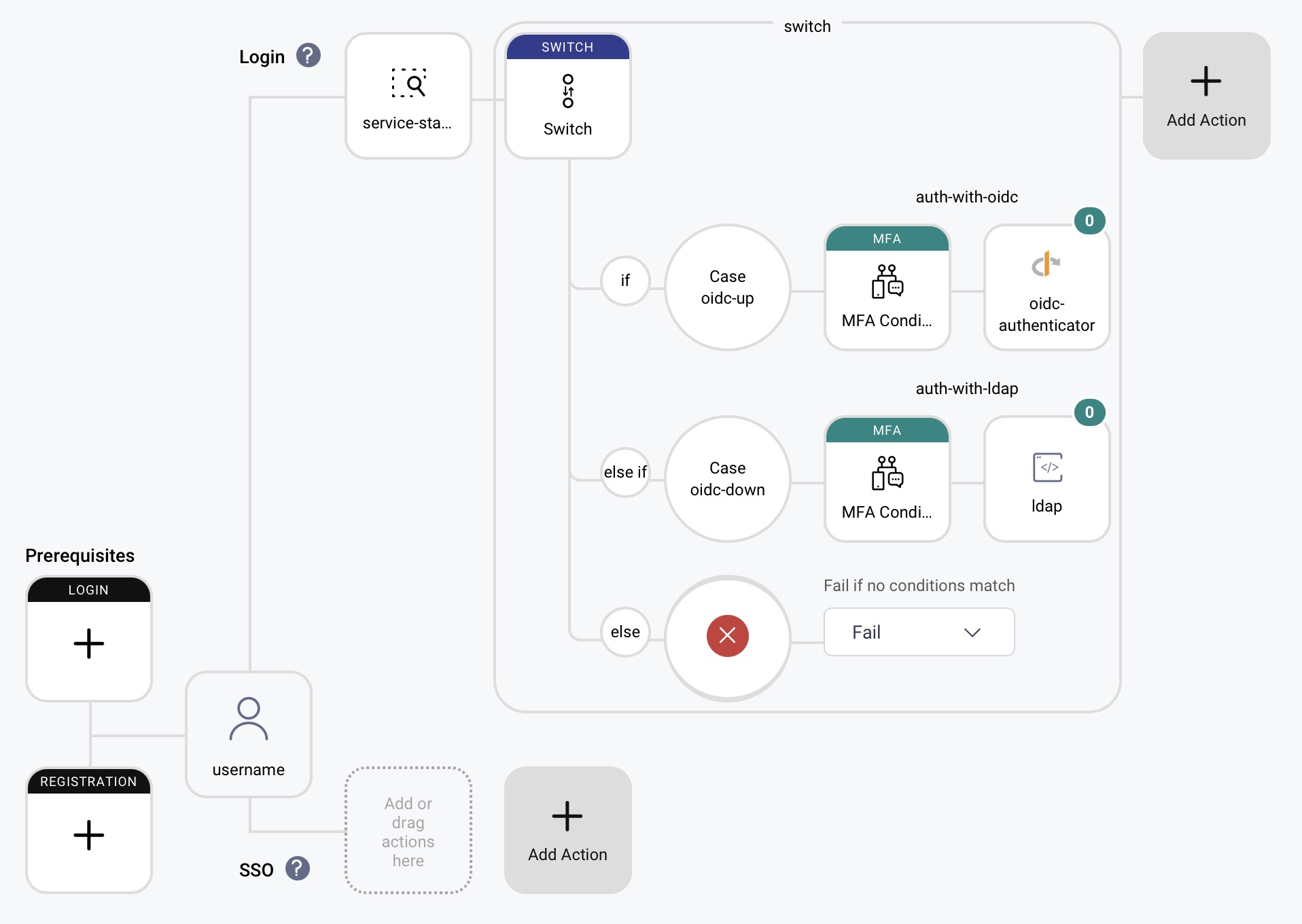
The Curity Identity Server’s authentication actions fully handle the authentication fallback flow. These actions create a pipeline of code and actions that executes in the user authentication context. A username authenticator captures the username. As mentioned, its main purpose is to start the authentication pipeline and enable the execution of subsequent actions.
This is an Admin UI overview of what the configuration looks like:
Service Status Checker
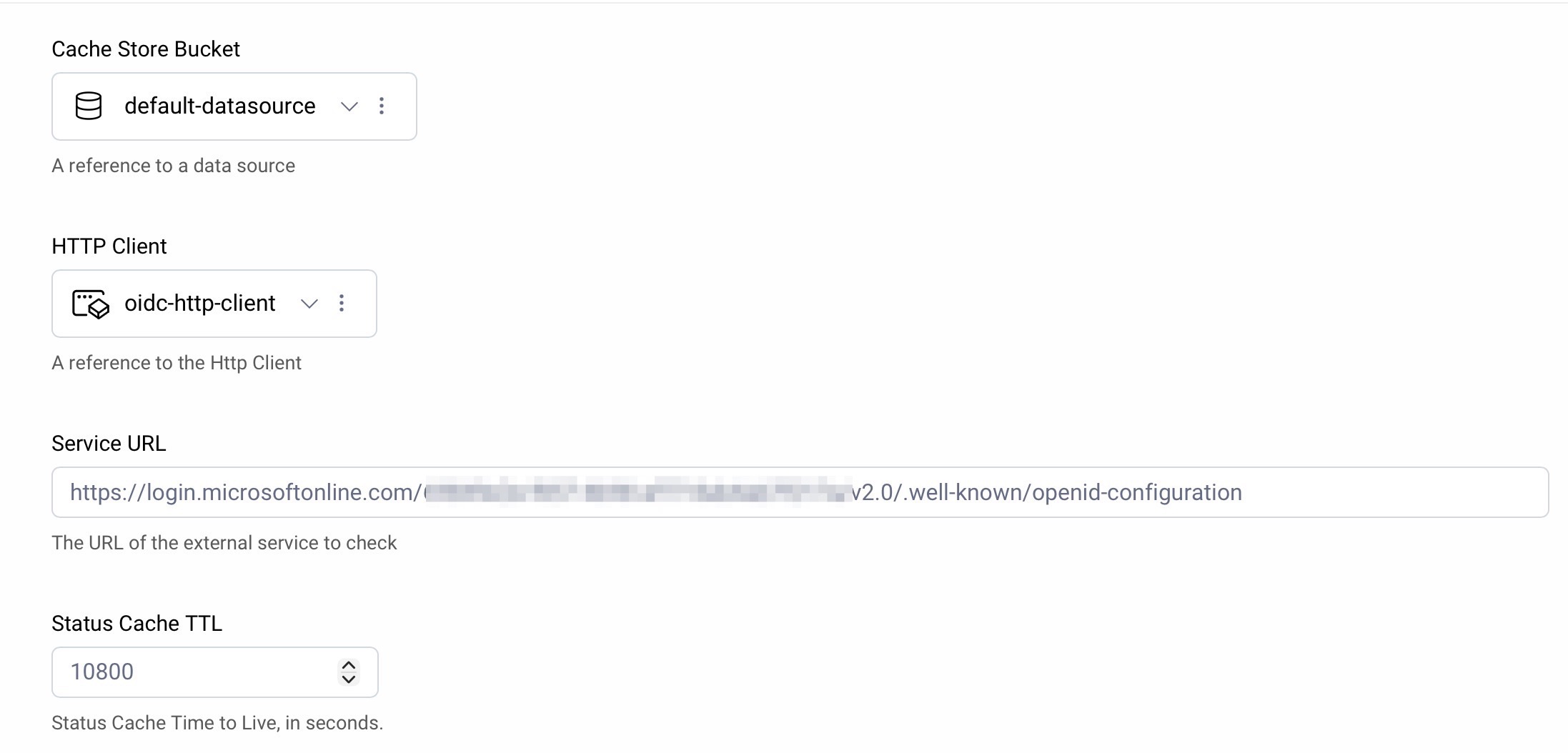
The core part of this use case is to determine if the primary authentication service is available or not. That is the responsibility of the service status checker, a custom Authentication Action. It makes an HTTP call to the primary authentication service endpoint and evaluates the response. If the service is available, it sets an action attribute, attributes.action.serviceIsUp to true. Otherwise it sets it to false.
The action has a couple of trivial configuration options:
- Cache Store Bucket - Where to store the cache decision
- HTTP Client - A configured HTTP client to use for the callout to the service.
- Service URL - The endpoint to call to check service status.
- Status Cache TTL - How long to cache the service status decision.
Switch Action
The switch action evaluates the attribute set by the service status checker. If the attribute indicates that the service is up, the primary authenticator is invoked via a configured Multi Factor Condition Action. If not, the secondary authenticator is invoked instead.
MFA Condition Actions
Two MFA Condition Actions are used to invoke the respective authenticators. The first one is configured to use the OIDC authenticator and the second one is configured to use the HTML Form with LDAP authenticator. Each MFA Condition Action has its condition set to always as the condition is already determined buy the combination of the service checker and the switch action.
Second Factor Subject Check
Note that depending on the setup it might be necessary to turn on the Disable Second Factor Subject Check flag in the MFA Condition Action. This will allow the action to proceed even if the subject captured from the username authenticator does not match the subject returned from the primary authenticator. This is often the case when using external identity providers.
Summary
Fallback authentication ensures that temporary outages of third-party identity systems do not impact user access. It reduces operational risk and avoids downtime in customer-facing services. With synchronized credentials between the primary and fallback authenticators, users can seamlessly switch between them without disruption.

Join our Newsletter
Get the latest on identity management, API Security and authentication straight to your inbox.

Start Free Trial
Try the Curity Identity Server for Free. Get up and running in 10 minutes.
Start Free TrialWas this helpful?