
On this page
The Curity Identity Server can integrate with an Istio Service Mesh and with SPIFFE and SPIRE. In those environments, workloads can use a SPIFFE Verifiable Identity Document (SVID) for strong authentication. X509 SVIDs enable the use of mutual TLS between workloads in service meshes, where middleware like sidecars manage certificates, keys and their renewal.
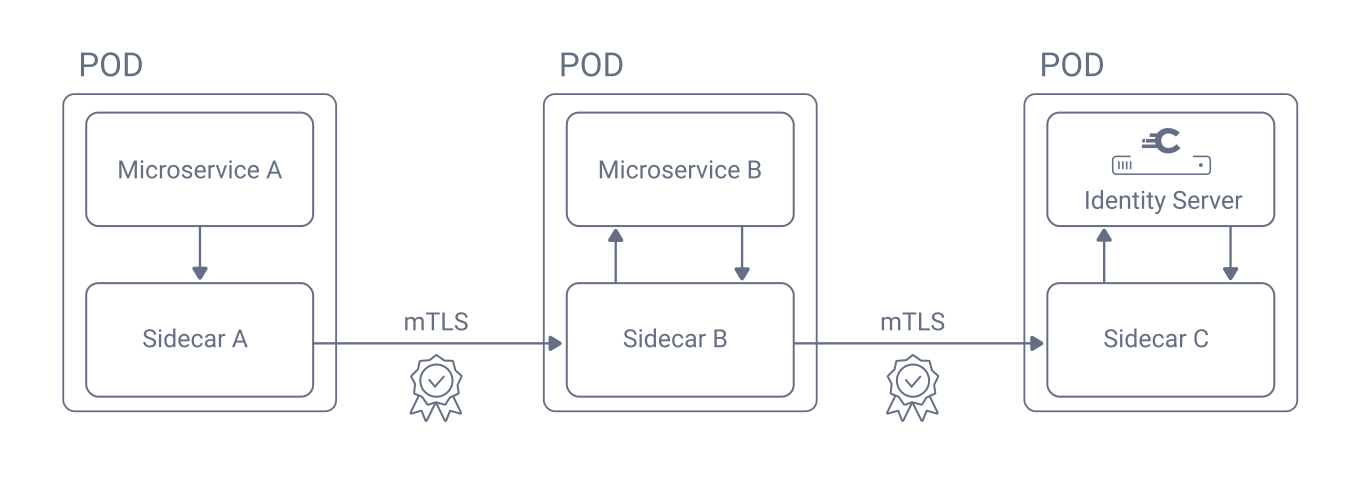
A workload can use an X509 SVID as part of a high-security flow that includes both mutual TLS for strong client authentication and certificate-bound access token as described in RFC 8705: OAuth 2.0 Mutual-TLS Client Authentication and Certificate-Bound Access Tokens. The additional security benefit over JWT SVIDs is that a malicious party which intercepts a certificate-bound access token cannot use it to successfully gain access to APIs.
Mutual TLS Client Authentication
The Token Profile Guide explains the Curity Identity Server options for mutual TLS for client authentication. The Curity Identity Server can load a server X509 certificate and enforce mutual TLS directly, or can use mutual TLS terminated by a proxy.
In service mesh environments, mutual TLS terminated by a proxy is a convenient way to use an X509 SVID to get a certificate-bound access token. The Curity Identity Server can trust its sidecar to implement mutual TLS authentication and then receive the client certificate in an HTTP header.
The following example configuration shows how to apply an Envoy Filter to an Istio sidecar, to enable runtime containers of the Curity Identity Server to receive the client certificate of the calling workload's X509 SVID in an x-client-certificate header.
cat <<EOF | kubectl -n curity apply -f -apiVersion: networking.istio.io/v1alpha3kind: EnvoyFiltermetadata:name: x509-filternamespace: curityspec:workloadSelector:labels:role: curity-idsvr-runtimeconfigPatches:- applyTo: HTTP_FILTERmatch:context: SIDECAR_INBOUNDlistener:portNumber: 8443filterChain:filter:name: "envoy.filters.network.http_connection_manager"subFilter:name: "envoy.filters.http.router"patch:operation: INSERT_BEFOREvalue:name: envoy.filters.http.luatyped_config:"@type": "type.googleapis.com/envoy.extensions.filters.http.lua.v3.Lua"inlineCode: |function envoy_on_request(request_handle)local streamInfo = request_handle:streamInfo()if streamInfo ~= nil thenlocal downstreamSsl = streamInfo:downstreamSslConnection()if downstreamSsl ~= nil thenrequest_handle:headers():add("x-client-certificate", downstreamSsl:urlEncodedPemEncodedPeerCertificate())endendendEOF
Configure X509 Trust Stores
Whether a client uses mutual TLS or mutual TLS terminated by a proxy, the Curity Identity Server verifies the trust chain of received client certificates. To ensure working trust, configure X509 certificate authorities for the issuer(s) of X509 SVIDs. In a simple deployment, like a standalone Istio service mesh, you may only need to trust a long-lived root certificate authority.
To configure trust in the Curity Identity Server, run the Admin UI and navigate to Facilities → Keys and Cryptography → Trust Anchors → Client Trust Stores. Add a new entry, pasting in the certificate's text. For Istio, use a command of the following form to retrieve the certificate's text.
kubectl -n istio-system get secret/istio-ca-secret -o jsonpath='{.data.ca-cert\.pem}'
For SPIFFE deployments the trust configuration can be more complex, since SPIRE uses short-lived intermediate certificates. You therefore need to keep client trust stores in the Curity Identity Server up to date. The Configure Trust for X509 SVIDs instructions explain some techniques you can use.
OAuth Client Registration
Before a workload can use its X509 SVID as an OAuth client credential, you must register an OAuth client in the Curity Identity Server. In the Admin UI, navigate to Profiles → Token Service → Clients and create an OAuth client. Add the client capabilities, to represent the OAuth flows that the client uses.
Next, select mutual-tls-by-proxy as the client authentication method. Under Select Client DN or Alternative Name select the client-uri option and paste in the SPIFFE ID of the workload. Also add the client trust stores to validate the trust chain of the X509 SVID.
Next, navigate to Profiles → Token Service → Client Settings → Client Authentication and enable the option Mutual TLS by Proxy. Populate the HTTP Header field with the name of the HTTP header with which the Curity Identity Server receives the client certificate. For example, the EnvoyFilter from above adds the client certificate in the x-client-certificate HTTP header.
The following XML provides example settings for a client that authenticates via mutual TLS terminated by proxy. Save the file to an XML file and import into the Admin UI using the Changes → Upload menu option (you may need to adjust the trusted-ca entries).
<config xmlns="http://tail-f.com/ns/config/1.0"><profiles xmlns="https://curity.se/ns/conf/base"><profile><id>token-service</id><type xmlns:as="https://curity.se/ns/conf/profile/oauth">as:oauth-service</type><settings><authorization-server xmlns="https://curity.se/ns/conf/profile/oauth"><scopes><scope><id>reports</id><description>Example reports scope</description></scope></scopes><client-authentication><mutual-tls><by-proxy><client-certificate-http-header>x-client-certificate</client-certificate-http-header></by-proxy></mutual-tls></client-authentication><client-store><config-backed><client><id>x509_certificate_client</id><mutual-tls-by-proxy><client-uri>spiffe://curitydemo/ns/applications/sa/workload-client</client-uri><trusted-ca>workload_root_ca</trusted-ca><trusted-ca>workload_intermediate_ca</trusted-ca></mutual-tls-by-proxy><access-token-ttl>900</access-token-ttl><audience>api.curitydemo.example</audience><scope>reports</scope><capabilities><client-credentials/></capabilities></client></config-backed></client-store></authorization-server></settings></profile></profiles></config>
Run an OAuth Flow
The workload can now send an HTTP request with the X509 SVID to authenticate at endpoints of the Curity Identity Server. The following example shows how a workload in a service mesh can send a plain HTTP request, after which middleware like a sidecar sends an X509 workload credential to the Curity Identity Server.
JWT_ASSERTION="$cat /svids/jwt_svid.token)"curl -s -X POST http://curity-idsvr-runtime-svc.curity:8443/oauth/v2/oauth-token \-H 'Content-Type: application/x-www-form-urlencoded' \-d 'grant_type=client_credentials' \-d 'scope=reports' | jq
The middleware of the pod of the Curity Identity Server validates the mutual TLS connection and forwards the client certificate to the main runtime container, which verifies its trust chain. The workload then receives a scoped access token that it can send to APIs, to access authorized business resources. The access token is bound to the workload's client certificate, as indicated by its cnf claim.
{"jti": "f94fe033-3ae1-4b0f-93d2-94ec61e25786","delegationId": "21366062-3e2f-4edc-abdc-4ea69a796d7e","exp": 1763547300,"nbf": 1763546400,"scope": "reports","iss": "https://login.curitydemo.example/oauth/v2/oauth-anonymous","sub": "x509_certificate_client","aud": "api.curitydemo.example","iat": 1763546400,"purpose": "access_token","cnf": {"x5t#S256": "KzsDJ3mnKKBnpbu0YkpYzH_O4YYCNHc-d_KNLwLVe5E"}}
Certificate-Bound Validation in APIs
To complete the flow from the RFC 8705 specification, the workload needs to send the access token to an API using a mutual TLS connection. The API (or its sidecar) must validate that the client certificate from the mutual TLS connection fulfills the binding in the cnf claim, e.g. by comparing the hash value. For an example implementation, see Curity's LUA sender-constrained token plugin.
Each pod within a clustered service receives distinct certificates. Similarly, when an X509 SVID is renewed, the pod receives a new certificate. If a certificate-bound token is sent by a pod with a different certificate to that used during token issuance, certificate-bound validation will fail. You could treat certificate renewal as an expiry event and return an HTTP 401 response that triggers the client to get a new access token.
Certificate-Bound Validation and External Clients
Certificate-bound validation with X509 SVIDs works best for backend clients. For external clients, the API (or its sidecar) may receive the X509 identity of an API gateway, which would cause certificate-bound access token validation to fail.
Example Deployment
The GitHub repository link at the top of this page enables you to run a number of workload identity deployments on a local computer. The fourth deployment runs a Kubernetes cluster and uses the techniques that this tutorial explains. You find the resources in the 4-spiffe-and-spire-x509-svids folder. You can deploy a working local system with the following commands. The deployment also shows a way to keep trust stores for SPIRE intermediate certificate authorities up to date.
./1-create-cluster.sh./2-deploy-cert-manager.sh./3-deploy-spire.sh./4-deploy-service-mesh.sh./5-deploy-curity-identity-server.sh./6-deploy-application-workloads.sh
For full details on the deployment's prerequisites and usage, see the GitHub repository's README files. Once the deployment completes, you can remote to the client workload and run a hardened Client Credentials Flow, to exchange an X509 SVID for a certificate-bound access token. You can use the same client authentication method for other OAuth flows.
Issuing Claims from X509 SVIDs
SPIRE provides a Plugin SDK that enables a CredentialComposer to customize the attributes of X509 SVIDs. During access token issuance, the Curity Identity Server can read X509 SVID attributes and apply custom logic to determine claims to issue to access tokens.
To read X509 SVID attributes, use a Client Certificate Claims Value Provider. If that does not meet your needs, use the Curity Identity Server's Java SDK to develop a Custom Claims Provider plugin that uses Java code to read certificate attributes and set access token claim values.
Conclusion
Modern cloud native platforms provide built-in features to issue short-lived workload X509 credentials, to enable mutual TLS between backend components. The Curity Identity Server enables you to use X509 client authentication (to prevent impersonation) with OAuth authorization (to ensure the correct level of access) and receive sender-constrained access tokens (to protect against access token theft).

Join our Newsletter
Get the latest on identity management, API Security and authentication straight to your inbox.

Start Free Trial
Try the Curity Identity Server for Free. Get up and running in 10 minutes.
Start Free TrialWas this helpful?