
On this page
The Integrate the Curity Identity Server with SPIFFE and SPIRE tutorial explains how to deploy a demo SPIRE environment. Administrators can register workloads with SPIRE and enable them to download JWT SVIDs (SPIFFE Verifiable Identity Documents). A workload can use its JWT SVID as a workload credential, to authenticate with other workloads including the Curity Identity Server.
For workloads that run in SPIRE deployments, you can replace OAuth client secrets and use JWT SVIDs as OAuth client credentials. The SVID then serves as a JWT client assertion that the Curity Identity Server can verify. SPIRE keeps JWT SVIDs short-lived and enables workloads to automatically renew them, as a mitigation against JWT SVID interception.
Client Assertion Flow with JWT SVIDs
The following diagram shows how a client application (the workload) can call the Curity Identity Server and present a JWT SVID as a client assertion. To verify received JWT SVIDs, the Curity Identity Server calls the SPIFFE JWKS URI to get a public key that can verify the JWT SVID's digital signature.
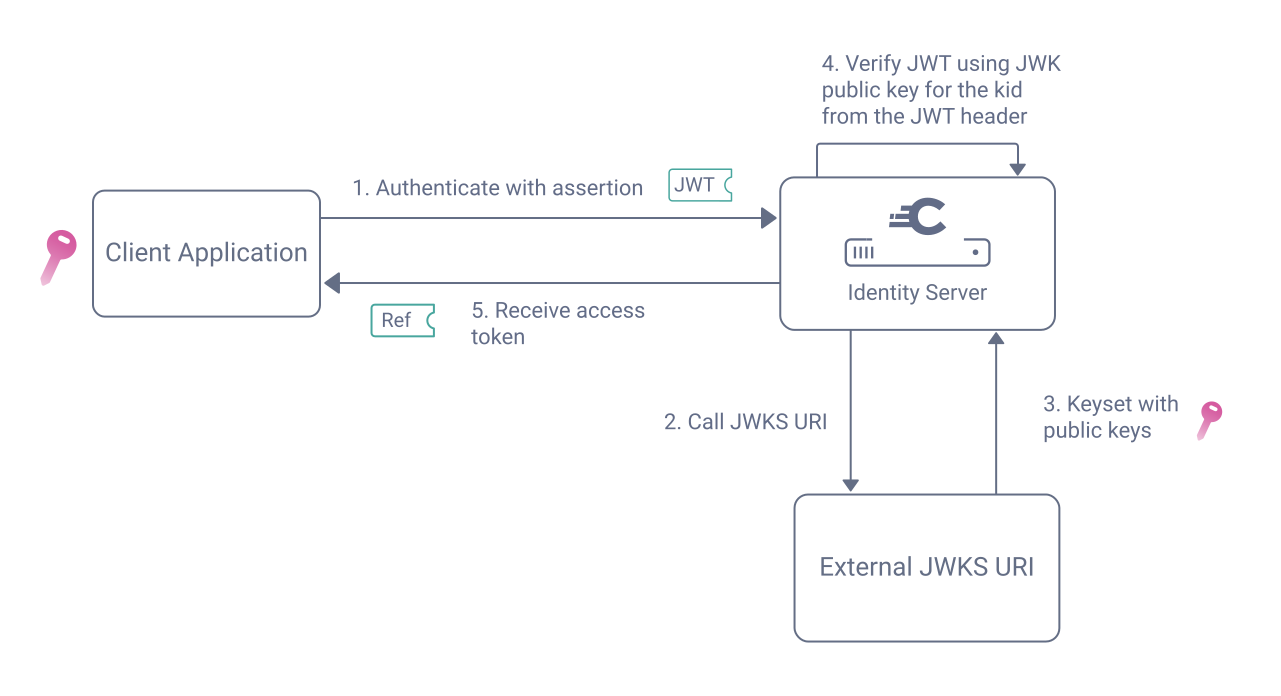
The Client Assertions and the JWKS URI article outlines the underlying design in more detail.
Download JWT SVIDs
The SPIFFE Helper utility provides a convenient way for workloads to download JWT SVIDs and keep them up to date. Set the jwt_audience property of the SPIFFE helper configuration file to the external endpoint of the Curity Identity Server at which the workload authenticates. This setting is necessary because the Curity Identity Server rejects any client assertions that are not intended for it for security reasons.
The following example SPIFFE helper settings demonstrate the approach.
daemon_mode = trueagent_address = "/spiffe-workload-api/socket"cmd = ""cmd_args = ""cert_dir = "/svids"renew_signal = ""svid_file_name = "svid.pem"svid_key_file_name = "svid_key.pem"svid_bundle_file_name = "svid_bundle.pem"jwt_svids = [{jwt_audience="https://login.curitydemo.example/oauth/v2/oauth-token", jwt_svid_file_name="jwt_svid.token"}]jwt_bundle_file_name = "jwt_bundle.json"add_intermediates_to_bundle = true
In this example, the workload receives a JWT SVID on a local volume at /svids/jwt_svid.token. If you use OAuth Tools to decode the JWT, you see a header and payload similar to the following.
{"alg": "ES256","kid": "rwn03JoPg7NkRhMxqiWu32OjbvXMwjc9","typ": "JWT"}{"aud": ["https://login.curitydemo.example/oauth/v2/oauth-token"],"exp": 1763544838,"iat": 1763541238,"iss": "https://oidc-discovery.curitydemo","sub": "spiffe://curitydemo/ns/applications/sa/workload-client"}
Confirm that the audience value of the JWT SVID points to the correct endpoint. Adapt the configuration of the SPIFFE helper if necessary. This example uses the client assertion to authenticate the workload when retrieving access tokens from the token endpoint. Therefore, the aud claim contains the (external) token endpoint of an instance of the Curity Identity Server.
Note down the values of the alg claim in the header of the JWT, the iss claim and the sub claim in its payload. You need these values later when registering the client and configuring the trust. Another setting you need in that context is the JWKS URI, an endpoint where the SPIRE OIDC discovery service publishes the signature verification keys of the JWT SVIDs.
Prepare the JWKS URI
When a client sends a JWT SVID in an OAuth request, the Curity Identity Server calls the SPIRE JWKS URI to get the signature verification keys, and use them to verify the digital signature of the SVID. Therefore, identify the JWKS URI for your environment. By default, the SPIRE OIDC Discovery Provider publishes the keys at the /keys endpoint. The value will be similar to the following.
https://spire-spiffe-oidc-discovery-provider.spire-server/keys
You may need to configure a server trust store for the HTTPS connection of the SPIRE JWKS URI. If so, follow the instructions from Configure Trust for JWT SVIDs. Then, in the Admin UI, navigate to Facilities → HTTP Clients and add a new HTTP client. Select the Use Trust Store option and accept all other defaults.
OAuth Client Registration
To enable the workload to use the JWT SVID as a client credential, register an OAuth client in the Curity Identity Server. In the Admin UI, navigate to Profiles → Token Service → Clients and create an OAuth client. Add the client capabilities, to represent the OAuth flows that the client uses.
Next, select jwks-uri as the authentication method. When prompted, enter the SPIRE JWKS URI and the HTTP client that uses the trust store. Next, select the Enable Custom Assertion JWT Validation option and enter the issuer, which you can find from the iss claim in a JWT SVID.
Next, navigate to Profiles → Token Service → Client Settings → Client Authentication and enable the option Asymmetrically Signed JWT. Select the algorithm that matches the JWT header of the JWT SVID, such as ES256. Under Client ID Mappings, map the technical sub claim in the JWT SVID to the client ID of the client that you just created:
The following XML provides example settings that you could save to an XML file and import into the Admin UI using the Changes → Upload menu option.
<config xmlns="http://tail-f.com/ns/config/1.0"><profiles xmlns="https://curity.se/ns/conf/base"><profile><id>token-service</id><type xmlns:as="https://curity.se/ns/conf/profile/oauth">as:oauth-service</type><settings><authorization-server xmlns="https://curity.se/ns/conf/profile/oauth"><scopes><scope><id>reports</id><description>Example reports scope</description></scope></scopes><client-authentication><asymmetrically-signed-jwt><signature-algorithm>RS256</signature-algorithm></asymmetrically-signed-jwt><using-jwt><client-id-mappings><client-id-mapping><sub>system:serviceaccount:applications:workload-client</sub><client-id>jwt_assertion_client</client-id></client-id-mapping></client-id-mappings></using-jwt></client-authentication><client-store><config-backed><client><id>jwt_assertion_client</id><jwks-uri><uri>https://spire-spiffe-oidc-discovery-provider.spire-server/keys</uri><http-client>workload_trust_client</http-client></jwks-uri><assertion-jwt-validation><issuer>https://oidc-discovery.curitydemo</issuer></assertion-jwt-validation><access-token-ttl>900</access-token-ttl><audience>api.curitydemo.example</audience><scope>reports</scope><capabilities><client-credentials/></capabilities><properties><property><key>at_issuer</key><value>jwt</value></property></properties></client></config-backed></client-store></authorization-server></settings></profile></profiles></config>
Run an OAuth Flow
The workload can now send an HTTP request with the JWT SVID to authenticate at endpoints of the Curity Identity Server. The following example shows how a workload in a Kubernetes cluster can load the current JWT SVID and send it to authenticate at the token endpoint.
JWT_ASSERTION="$cat /svids/jwt_svid.token)"curl -s -X POST http://curity-idsvr-runtime-svc.curity:8443/oauth/v2/oauth-token \-H 'Content-Type: application/x-www-form-urlencoded' \-d 'grant_type=client_credentials' \-d "client_assertion=$JWT_ASSERTION" \-d 'client_assertion_type=urn:ietf:params:oauth:client-assertion-type:jwt-bearer' \-d 'scope=reports' | jq -r
On success, the workload receives a scoped access token that it can send to APIs, to gain access to authorized business resources.
{"access_token": "eyJraWQiOiItMTMyNzIzNjAwMCIsIng1dCI6Ijd2Y1NWS3BPWWU ...","scope": "reports","token_type": "bearer","expires_in": 900}
Example Deployment
The GitHub repository link at the top of this page enables you to run a number of workload identity deployments on a local computer. The third deployment runs a Kubernetes cluster and uses the techniques that this tutorial explains. You find the resources in the 3-spiffe-and-spire-jwt-svids folder. You can deploy a working local system with the following commands.
./1-create-cluster.sh./2-deploy-cert-manager.sh./3-deploy-spire.sh./4-deploy-curity-identity-server.sh./5-deploy-application-workloads.sh
For full details on the deployment's prerequisites and usage, see the GitHub repository's README files. Once the deployment completes, you can remote to the client workload and run a hardened Client Credentials Flow, to exchange a JWT SVID for an OAuth access token. You can use the same client authentication method for other OAuth flows.
Issuing Claims from JWT SVIDs
SPIRE provides a Plugin SDK that enables a CredentialComposer to customize the attributes of JWT SVIDs. For example, you could provision AI agent workloads with an additional attribute.
During access token issuance, the Curity Identity Server can use JWT SVID attributes to determine claims to issue to access tokens. To do so, use JavaScript to implement a Script Claims Value Provider. The following example transforms a string client_type attribute from the JWT SVID to a boolean is_agent access token claim.
function base64UrlDecode(payload) {var str = payload.replace(/=/g, '');var decodedBytes = java.util.Base64.getDecoder().decode(str);return new java.lang.String(decodedBytes, 'UTF-8');}function result(context) {var jwtSvid = context.getRequest().getFormParameterValues('client_assertion')[0];var parts = jwtSvid.split('.');var payload = base64UrlDecode(parts[1]);var jwtSvidClaims = JSON.parse(payload);return { is_agent: jwtSvidClaims.client_type === 'ai-agent' };}
Conclusion
SPIRE and comparable SPIFFE implementations issue short-lived workload credentials, to enable strong client authentication between backend components. The Curity Identity Server enables you to combine strong client authentication (to prevent impersonation) with OAuth authorization (to ensure the correct level of access).

Join our Newsletter
Get the latest on identity management, API Security and authentication straight to your inbox.

Start Free Trial
Try the Curity Identity Server for Free. Get up and running in 10 minutes.
Start Free TrialWas this helpful?