
On this page
A service mesh can extend the behaviors of a Kubernetes cluster, to provide additional ways to separate infrastructure concerns from application code. For example, a service mesh can override networking and route all requests via middleware like sidecars. The mesh can also issue X509 certificates and keys to sidecars. When a workload calls another workload, the source sidecar can intercept the request and create a mutual TLS connection to the target sidecar providing confidentiality and authenticity for connections.
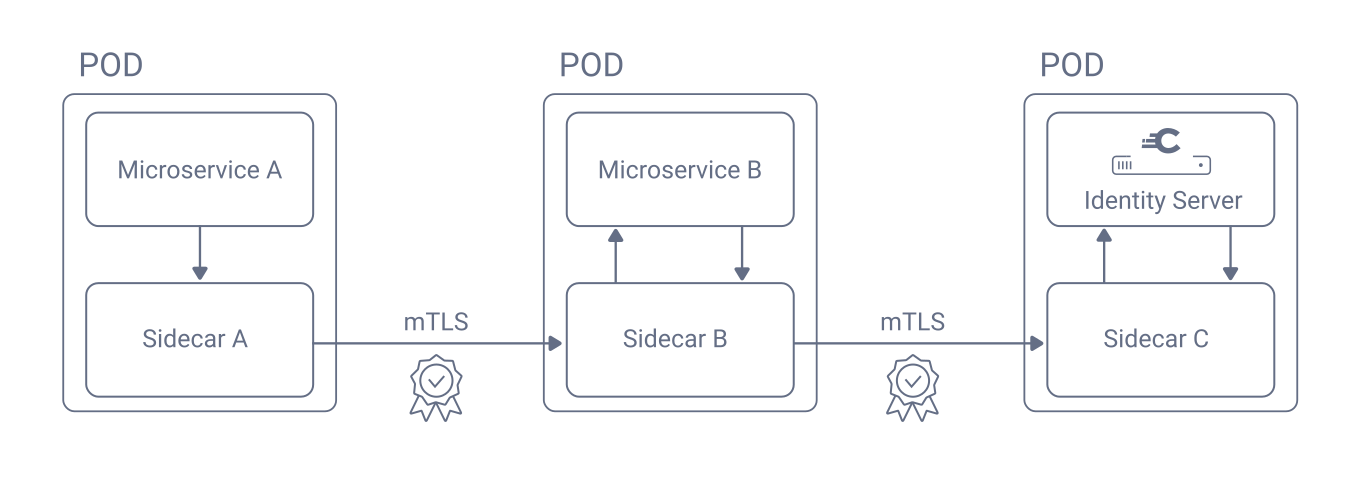
In some cases, service meshes may use an alternative, sidecar-less mechanism for routing requests between services. Regardless of the networking mechanics, a service mesh with mutual TLS provides an elegant way to ensure confidentiality and authenticity for internal API and OAuth requests. The mesh components manage complexities like certificate issuance and renewal, and keep certificates short-lived. Workloads can call each other securely using plain HTTP URLs.
This tutorial walks through an example integration of the Istio service mesh with the Curity Identity Server to secure internal connections. First, ensure that you have a Kubernetes test cluster, then follow the deployment steps.
Deploy the Istio Service Mesh
Istio is a popular service mesh that you can deploy with the Istio Helm Charts. The following commands deploy some base configuration and a minimal deployment of the Istiod control plane component. Istio components can trigger sidecar creation for application workloads and implement certificate management to enable mutual TLS.
helm repo add istio https://istio-release.storage.googleapis.com/chartshelm repo updatehelm upgrade --install istio-base istio/base \--namespace istio-system \--create-namespacehelm upgrade --install istiod istio/istiod \--namespace istio-system \--set meshConfig.trustDomain='curitydemo'
Require Mutual TLS
If required, create a namespace for the deployment of the Curity Identity Server.
cat <<EOF | kubectl apply -f -apiVersion: v1metadata:name: curityEOF
Then, create distinct service accounts for the admin and runtime workloads. Istio sidecars for the admin and runtime workloads will then use X509 identities based on the service account names.
cat <<EOF | kubectl -n curity apply -f -apiVersion: v1kind: ServiceAccountmetadata:name: curity-idsvr-admin---apiVersion: v1kind: ServiceAccountmetadata:name: curity-idsvr-runtimeEOF
Finally, require peer authentication for the admin and runtime workloads. Sidecars will then reject any incoming request that does not provide a client certificate.
cat <<EOF | kubectl -n curity apply -f -apiVersion: security.istio.io/v1beta1kind: PeerAuthenticationmetadata:name: idsvr-runtime-mtlsspec:selector:matchLabels:role: curity-idsvr-runtimemtls:mode: STRICT---apiVersion: security.istio.io/v1beta1kind: PeerAuthenticationmetadata:name: idsvr-admin-mtlsspec:selector:matchLabels:role: curity-idsvr-adminmtls:mode: STRICTEOF
Deploy Sidecars
Next, use an Istio option to create sidecars for the admin and runtime workloads. For example, the Curity Identity Server Helm Chart enables you to apply the Istio sidecar.istio.io/inject annotation to inject sidecars. The following example values file demonstrates how to apply that annotation.
replicaCount: 1image:repository: curity.azurecr.io/curity/idsvrtag: latestcurity:adminUiHttp: trueadmin:podLabels:sidecar.istio.io/inject: 'true'serviceAccount:name: curity-idsvr-adminruntime:podLabels:sidecar.istio.io/inject: 'true'serviceAccount:name: curity-idsvr-runtimeconfig:uiEnabled: trueconfiguration:- configMapRef:name: idsvr-configitems:- key: idsvr-configpath: curity-config.xml
The Helm chart then deploys admin and runtime workloads for the Curity Identity Server that consist of two containers. By default, the first container is named idsvr-admin or idsvr-runtime. The second container is the Istio sidecar, which is an instance of the Envoy Proxy, with a name of istio-proxy.
NAMESPACE NAME READY STATUScurity curity-idsvr-admin-6d74bf475f-65wn9 2/2 Runningcurity curity-idsvr-runtime-7798549bbb-5zkrf 2/2 Running
Test with a Client Workload
Next, deploy any client workload that also uses a service account and Istio sidecars. The following example command demonstrates how a workload can initiate HTTP requests to internal endpoints of the Curity Identity Server. This example request calls the JWKS URI endpoint to download token signing public keys.
POD=$(kubectl -n applications get pods --selector='app=workload-client' -o=name)kubectl -n applications exec "$POD" -- \curl -s http://curity-idsvr-runtime-svc.curity:8443/oauth/v2/oauth-anonymous/jwks | jq
Grant API Gateway Access
If you configure the Curity Identity Server workloads to require mutual TLS, make sure external requests from outside the cluster continue to work. Typically, an API gateway exposes the Curity Identity Server's endpoints. Therefore, ensure that the API gateway has an authorized workload identity that can call the Curity Identity Server.
If you use the Istio ingress gateway, it has a built-in workload identity. For other API gateways, use a solution like adding an Istio sidecar to gateway pods. Some API gateways may apply optimizations to call pods directly, causing mutual TLS connections to fail. Therefore, ensure that the gateway calls Kubernetes service URLs with their internal hostnames. You may need to apply annotations like ingress.kubernetes.io/service-upstream: 'true' and preserve-host: 'false' to the gateway's deployment.
View X509 Workload Identities
You can use a command of the following form to view how the Curity Identity Server's sidecar presents an X509 identity to client workloads during internal OAuth requests.
POD=$(kubectl -n applications get pods --selector='app=workload-client' -o=name)kubectl -n applications exec "$POD" -c istio-proxy \-- openssl s_client -showcerts \-connect curity-idsvr-runtime-svc.curity:8443 \-CAfile /var/run/secrets/istio/root-cert.pem 2>/dev/null | \openssl x509 -in /dev/stdin -text -noout
The certificate details include a Subject Alternative Name (SAN) URI field. The URI SAN includes the namespace and service account name of the Curity Identity Server's runtime workload.
X509v3 Subject Alternative Name: criticalURI:spiffe://curitydemo/ns/curity/sa/curity-idsvr-runtime
Istio bases its X509 identities on Secure Production Identity Framework For Everyone (SPIFFE) workload identity specifications. Istio uses SPIFFE IDs in the following format.
spiffe://<trust-domain>/ns/<namespace>/sa/<service-account>
Service meshes can use workload identifiers to restrict which workloads can call each other. In Istio you could configure an Authorization Policy with SPIFFE IDs, to only allow API workloads and the API gateway to call the Curity Identity Server's OAuth endpoints.
Example Deployment
The GitHub repository link at the top of this page enables you to run a number of workload identity deployments on a local computer. The second deployment uses the techniques that this tutorial explains. You can deploy a working local system with the following commands.
./1-create-cluster.sh./2-deploy-service-mesh.sh./2-deploy-curity-identity-server.sh./4-deploy-application-workloads.sh
For full details on the deployment's prerequisites and usage, see the GitHub repository's README files. Once the deployment completes, you can run the example commands from this tutorial, to call internal OAuth endpoints with mutual TLS.
OAuth Client Authentication
The Curity Identity Server supports OAuth clients that authenticate with Proxy Terminated Mutual TLS. Workloads can use Istio X509 workload credentials as a strong OAuth client credential and receive sender-constrained access tokens. The Harden OAuth Client Credentials with SPIFFE X509 SVIDs tutorial explains the configuration.
Conclusion
The Curity Identity Server is a cloud native product so you can integrate it with cloud native service meshes and assign it X509 workload identities. You can use the service mesh to implement cross-cutting concerns for internal traffic, for both APIs and the Curity Identity Server. A service mesh enables additional security use cases to harden internal traffic.

Join our Newsletter
Get the latest on identity management, API Security and authentication straight to your inbox.

Start Free Trial
Try the Curity Identity Server for Free. Get up and running in 10 minutes.
Start Free TrialWas this helpful?