SSO Revocation Plugins


On this page
The SSO revocation plugins GitHub repository demonstrates an approach to take closer control over Single Sign-on (SSO) sessions in the Curity Identity Server. The plugins also highlight some general extensibility behaviors, to use observability, store custom data, and then use that data to apply logic during a subsequent login operation.
Event Listener
An event listener enables you to implement custom logic during the execution of identity events. The example includes a StoreSsoSessionEventListener that subscribes to the CreatedSsoSessionEvent, which fires whenever an SSO session gets created, when a user first signs in with a particular authentication method using a particular user agent. Each such SSO session can span multiple clients.
The most essential listener code is shown here, to highlight how the plugin captures the user identity (subject), the session ID and the authentication method (acr). These values are then stored in a map, so that, given a particular subject, you can find all other sessions (including those from other browsers) for the subject and authentication method.
class StoreSsoSessionEventListener(private val config: StoreSsoSessionEventListenerConfiguration) :EventListener<CreatedSsoSessionEvent> {private val sessionBucket = SsoSessionsBucket(config.bucket, config.sessionsTtl)override fun getEventType(): Class<CreatedSsoSessionEvent> = CreatedSsoSessionEvent::class.javaoverride fun handle(event: CreatedSsoSessionEvent, eventMetaData: EventMetaData) {val subject = event.subjectval session = SsoSession(id = event.ssoId, acr = event.acr)when (val bucketResult = sessionBucket.getSessions(subject)) {is GetBucketResult.Success -> addSessionToBucket(subject, session, bucketResult.attributes())else -> {sessionBucket.store(subject, mapOf(session.id to session))}}}
Bucket Storage
The Curity Identity Server provides a bucket storage system that you can use to store custom data and then use that data across multiple extensibility points. For example, PostgreSQL uses the following database table to store bucket data.
CREATE TABLE buckets (id VARCHAR(64) NOT NULL DEFAULT uuid_generate_v4(),subject VARCHAR(128) NOT NULL,purpose VARCHAR(64) NOT NULL,tenant_id VARCHAR(64),attributes JSONB NOT NULL,created TIMESTAMP NOT NULL,updated TIMESTAMP NOT NULL,expires TIMESTAMP NULL,PRIMARY KEY (id));
To store custom data in a bucket row, assign a custom purpose value to entries that you store. The example plugin stores a single bucket row per subject, with a purpose of sso-sessions. The plugin code causes updates to the subject, expires and attributes fields. The plugin uses the attributes field to store a map of each session ID to its acr value, and can assign each session a time to live.
Authentication Action
The plugin includes a Check Session Status authentication action that runs during Single Sign-on (SSO). The action reads bucket data and denies access when a session has expired or been revoked. The following snippet shows a simplified version of the action's code, to set an action attribute (whose name defaults to sessionRevoked) to true when no valid session is found.
class CheckSsoSessionStatusAction : AuthenticationAction {private val sessionBucket = SsoSessionsBucket(config.bucket, config.sessionsTtl)override fun apply(context: AuthenticationActionContext): AuthenticationActionResult {val subject = context.authenticationAttributes.subjectAttributes.subjectvar actionAttributes = context.actionAttributesval currentSsoSessionId = context.authenticatedSessions.ssoIdval bucketResult = sessionBucket.getSessions(subject)when (bucketResult) {is GetBucketResult.Error -> {val session = SsoSession(id = currentSsoSessionId, acr = context.authenticatorDescriptor.acr)sessionBucket.store(subject, mapOf(currentSsoSessionId to session))}is GetBucketResult.Success -> {if (!sessionBucket.containsSession(bucketResult.attributes(), currentSsoSessionId)) {actionAttributes = actionAttributes.with(Attribute.of(config.revocationAttributeName, true))}}}return successfulResult(context.authenticationAttributes, actionAttributes)}}
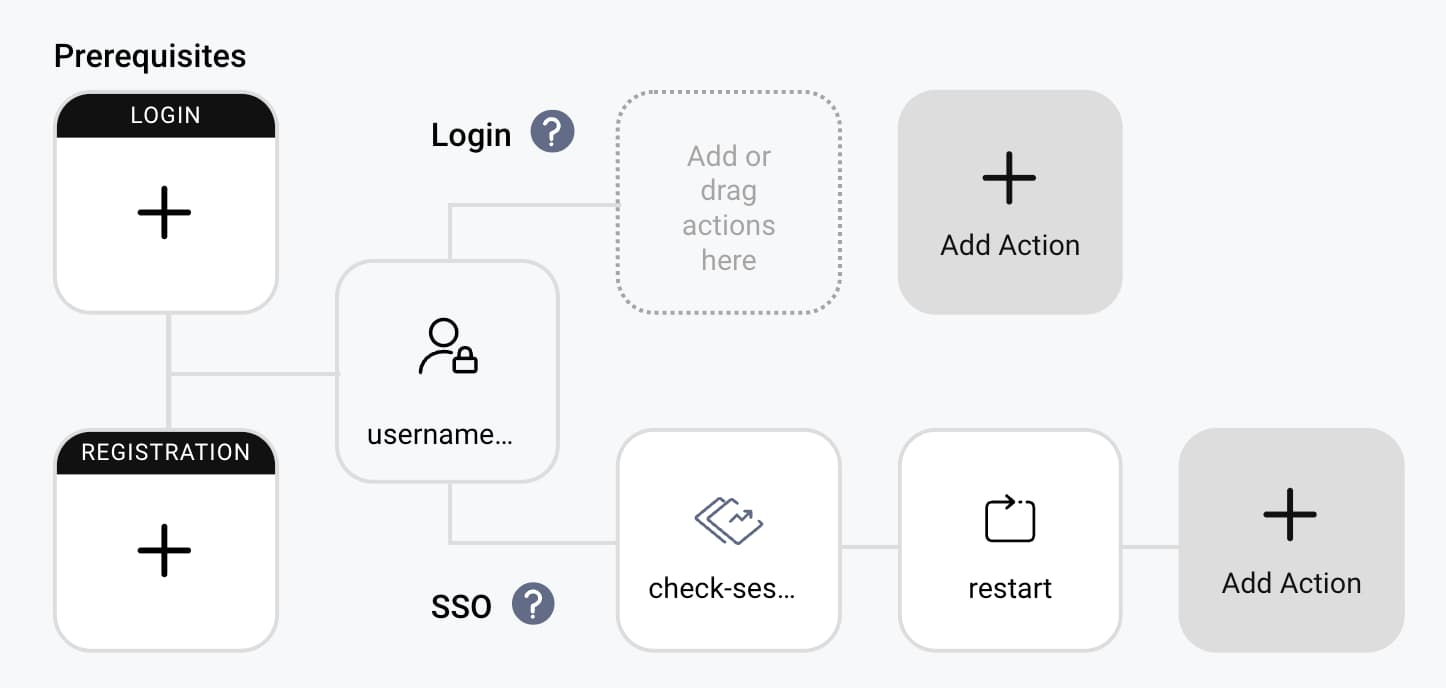
To activate a Check Session Status authentication action, configure it in an authenticator's SSO swimlane. Then, add a subsequent SSO authentication action that inspects the action attribute. The following screenshot shows a Restart Action to force a new login when sessionRevoked=true, or you could use the Deny Action to return an error to the client.
Session Revocation
By default, stored sessions expire after the configured time to live. You can revoke sessions before they expire in multiple ways. Revocation then comes into effect on the next login operation that attempts SSO.
The GraphQL API Documentation has some example bucket queries and mutations that you could use to manage and revoke sessions from applications. For example, you might use a custom profile page that allows a user to revoke one or more sessions.
Alternatively, you could revoke sessions after a logout event. To do so, add a second event listener that subscribes to the LogoutAuthenticationEvent. That event listener could read the subject of the user logging out and remove all of the user's sessions with the same acr value from the bucket data. The next login with that authentication method, from any client, in any browser, would then force a new login.
Deployment and Configuration
To use the plugin, follow the README instructions to build the plugin's code to produce a JAR file. Then, deploy the JAR file to the following location and run the Curity Identity Server.
$IDSVR_HOME/usr/share/plugins/session-revocation-plugins/session-revocation-plugins-<version>.jar
In the Admin UI, find the new Store Sso Session type under System → Event Listeners, and the new Check Session Status type under System → Profiles → Authentication Profile → Authentication Actions. For each plugin, select the bucket's data source and set the same session time to live value. The following XML shows an example configuration.
<config xmlns="http://tail-f.com/ns/config/1.0"><processing xmlns="https://curity.se/ns/conf/base"><event-listeners><event-listener><id>store-sso-session</id><store-sso-session xmlns="https://curity.se/ns/ext-conf/store-sso-session"><bucket><data-source>default-datasource</data-source></bucket></store-sso-session></event-listener></event-listeners></processing><profiles xmlns="https://curity.se/ns/conf/base"><profile><id>authentication-service</id><type xmlns:auth="https://curity.se/ns/conf/profile/authentication">auth:authentication-service</type><settings><authentication-service xmlns="https://curity.se/ns/conf/profile/authentication"><authentication-actions><authentication-action><id>check-session-status</id><check-session-status xmlns="https://curity.se/ns/ext-conf/check-session-status"><bucket><data-source>default-datasource</data-source></bucket></check-session-status></authentication-action><authentication-action><id>restart</id><restart xmlns="https://curity.se/ns/ext-conf/restart"><attribute-condition><name>sessionRevoked</name></attribute-condition></restart></authentication-action></authentication-actions></authentication-service></settings><profile><profiles><config>
SSO Usability Control
When users operate multiple OAuth clients, those clients can use multiple authentication methods (acr values) and run on different (desktop and mobile) browsers. In the Curity Identity Server, each browser gets an SSO cookie that contains session IDs. Backend data storage can link all sessions for a user together.
The plugin system of the Curity Identity Server enables you to integrate custom logic to apply SSO usability control in various ways. The SSO revocation plugin demonstrates the approach, to subscribe to events, store attributes in a data source, and then use those attributes during user authentication.
Customer Stories
Learn how organizations run identity and API security at scale.
Read customer storiesWas this helpful?