Learn OAuth API Security Coding Skills


On this page
Developers can use coding assistants (AI agents) to build APIs. Developers provide instructions to agents as input, the agent produces code as output. If you are new to OAuth API security or Curity's API Security Best Practices, you may not yet know which instructions to provide to AI agents.
Curity provides some example skills with which you can build OAuth-secured APIs. These instructions encourage a security-first developer setup where API developers can run suites of tests to prove that security works correctly. Clone the GitHub link at the top of this page to download the skills, which enable agents to automate the following main steps.
- Create a secure development setup.
- Authenticate API requests.
- Authorize API requests.
- Implement error responses, error logging and auditing.
- Deploy APIs to enable clients to integrate.
Configure the Assistant
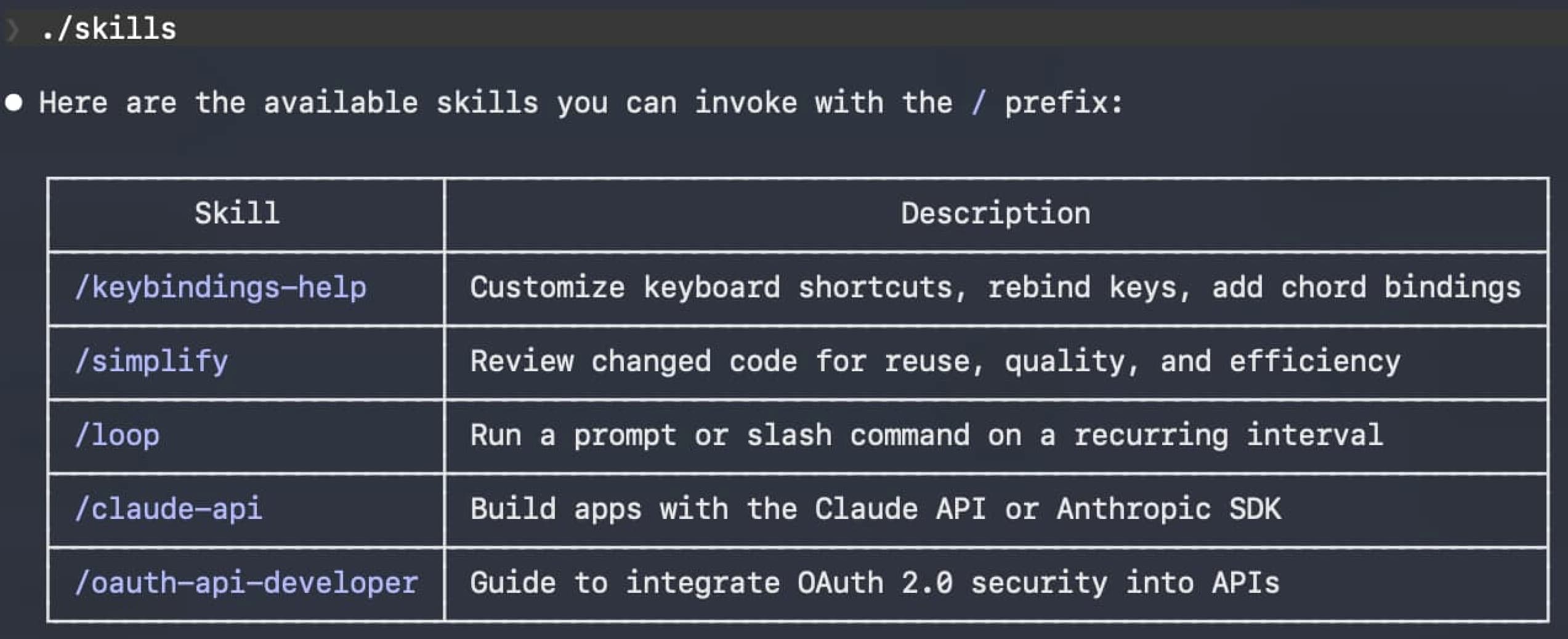
Run your coding assistant and follow the README instructions to integrate the skills. The following screenshot shows the OAuth skills running in Claude Code.
OAuth API Security Requirements
Developers who use agents to secure APIs must first understand security requirements. Most APIs should implement the following generic steps.
- The API code must verify a JWT access token on every request and follow JWT Security Best Practices.
- The API code must use claims-based authorization to restrict access to authorized resources.
- The API code must return useful error responses to clients when there is a security failure.
- The API code must output useful error and audit logs so that you understand and troubleshoot runtime security.
- The API should use automated tests to verify that the API's security works correctly.
Once API code is complete, you need the following deployment skills, to expose the API to real clients.
- Build and deploy the API.
- Run the Curity Identity Server alongside the API, to issue opaque access tokens to API clients.
- Run the API behind an API gateway, which delivers JWT access tokens to the API.
Often, a platform engineering or DevOps team does this work for real environments. However, a local deployment can help to derisk the real rollouts and also improve local test capabilities for developers.
Learn One Skill at a Time
To use the example instructions, consider the following steps, to implement one skill at a time:
- Create your own git repository for the example API.
- Study instructions for each skill, to ensure that you understand the agent's input.
- Study generated code and READMEs for each skill, to ensure that you understand the agent's code output.
- Build and run code for each skill to ensure that you get expected results.
- If the agent makes mistakes, troubleshoot to fix up issues and complete the skill.
- Commit completed code to source control before moving on to the next skill.
Implement Development Skills
For the first development skill, issue a command to the coding assistant to create a simple example API that operates on CRUD resources. Adapt the command to your preferred technology stack. Study results, where you only need to run the code for a single API component. Study the API's generated README and code, then build and run the API.
Implement an example API using .NET 10 and C#.
Move on to the next skill, to implement JWT validation, after which APIs consider an API request to be authenticated. Study README updates, instructions and generated code to verify that the code implements JWT security best practices, and ensure that the API still builds and runs without errors.
Add OAuth 2.0 JWT access token validation to the example API.
Move on to the next skill, to generate a suite of JWT validation integration tests, which send user-level access tokens to the API. Study README updates, instructions and generated tests, so that you understand how the tests produce mock access tokens and how the API validates them.
Add OAuth 2.0 JWT access token validation tests to the example API.
Next, implement some example authorization rules that use token attributes. Study README updates, instructions and generated code to understand how the API logic uses scopes and claims to restrict access to business resources.
Add OAuth 2.0 claims-based authorization logic to the example API.
Next, ask the coding assistant to generate a suite of unit tests to verify the API's example authorization logic. Study README updates, instructions and generated tests to understand how tests verify the correct use of token attributes to ensure that the API protects its business data.
Add OAuth 2.0 claims-based authorization tests to the example API.
Implement Deployment Skills
The Identity and Access Management Primer explains how API clients integrate with an authorization server to get opaque access tokens and call APIs via an API gateway. The API gateway uses the Phantom Token Pattern to deliver JWT access tokens to the API.
The GitHub repository provides an example API deployment. Inspect the deployments/api/README.md folder from the Curity resources, to understand prerequisites. Then, execute the following command to deploy the example API alongside an API gateway and the Curity Identity Server. The agent creates a Dockerfile that produces a release build of the API's code. The agent then runs a script to trigger a Docker deployment of all components.
Deploy the example API.
Study the API's updated README file to understand how to connect to the deployed API's HTTPS endpoints. Also inspect the contents of the deployments/api folder from the Curity resources, to understand how the deployment works. Next, simulate a client that calls the API using its external URL. The following command does not send a valid access token, so you will get an error response with an HTTP 401 status code.
ACCESS_TOKEN='42fb44ec-4d96-4f5a-ac48-abbd7e004a2a'curl -i -k https://api.demo.example -H "Authorization: Bearer $ACCESS_TOKEN"
Once you have completed all skills, you have a secured API with a productive secure development setup, solid reliability, and a deployment to which you can connect clients. You can follow similar approaches to update your real APIs.
Troubleshoot
In some cases, you may need to troubleshoot agent output. For example, code could fail to compile, your local computer's software may conflict with the generated code, or the compiler may be unable to resolve a security library dependency. In such cases, search online or ask the agent, as in the following example.
The generated code produces a Python ModuleNotFoundError for the PyJWT library. Tell me how to resolve that.
Agents can potentially generate incorrect code or misunderstand requirements. Developers are always ultimately responsible for the correct AI agent output. To help ensure that security code is correct, compare the agent results to Curity's fixed API Code Examples, which provide secure API integrations in many programming languages.
Update Real APIs
Once you understand the security techniques, you can follow similar approaches to integrate your real APIs. Typically you will first refine agent instructions (input) and agent output (code). You will also need to update authorization to match your particular business authorization rules, and update deployments to match your particular environments.
Conclusion
To correctly implement OAuth API security, both developers and agents must understand requirements. Curity's API skills aim to combine the use of AI automation with OAuth security standards, to provide productive security-first development setups that enable frequent verification of API security logic. Remember that, although AI can improve speed, developers are ultimately responsible for the correct API security.
Customer Stories
Learn how organizations run identity and API security at scale.
Read customer storiesWas this helpful?