


On this page
The Agent2Agent (A2A) Protocol enables A2A clients (like internet applications) to send natural language commands to A2A servers (API entry points). The A2A server can be a backend AI agent that integrates with a Large Language Model (LLM) from a cloud provider. The LLM can instruct the agent to call Model Context Protocol (MCP) tools to operate on data, in flexible ways. To get new outputs, users can issue a new natural language command.
This code example demonstrates how to integrate A2A and MCP, to safely enable the use of AI for enterprise customer support use cases. In the example scenario, customers sign in to an internet application and operate on their sensitive financial data, using natural language commands. The customer might ask the following initial question.
Give me a markdown report on the last 3 months of stock transactions and the value of my portfolio
The agent forwards this request to the LLM, which instructs the agent to get data from an MCP tool. The model can then accurately process the example request with data from the MCP server. The following example result illustrates a response that the model might return, which the agent would return to the internet application.
| Date | Stock | Transaction Type | Quantity | Unit Price (USD) | Total Value (USD) |
|---|---|---|---|---|---|
| 2025-09-21 | Company 1 | Buy | 300 | 426.54 | 127,962.00 |
| 2025-09-21 | Company 4 | Buy | 200 | 210.75 | 42,150.00 |
| 2025-12-10 | Company 4 | Sell | -50 | 165.75 | -8,287.50 |
| 2025-12-10 | Company 1 | Sell | -75 | 376.54 | -28,241.50 |
| 2026-01-19 | Company 1 | Buy | 50 | 396.54 | 19,827.00 |
| 2026-01-19 | Company 4 | Buy | 100 | 188.25 | 18,825.00 |
Total Portfolio Value: $151,891.00
Components
The code example uses Microsoft AI and integrates with the Azure AI Foundry, which provides various LLMs. The end-to-end flow uses three small .NET applications:
- An console application that acts as an internet A2A client.
- A backend AI agent that implements A2A server endpoints and integrates with the AI Foundry.
- A backend MCP server that applies business authorization to protect enterprise resources.
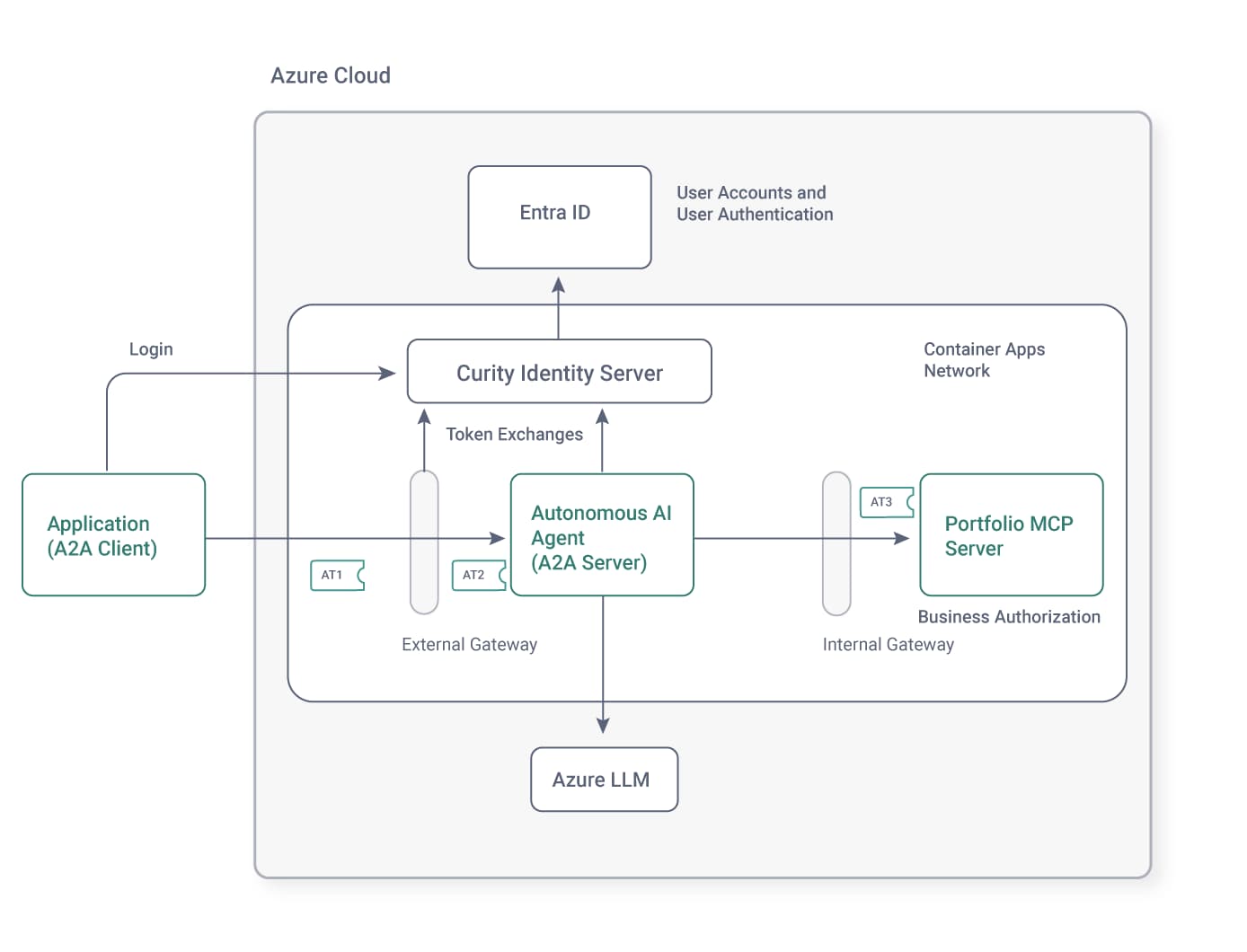
The example also demonstrates a secure deployment for AI agents. The user authenticates to get an access token for the internet application. An external API gateway uses the OAuth token exchange capabilities of the Curity Identity Server to deliver a least-privilege access token to the backend agent. The agent then calls the MCP server via an internal API gateway that can apply auditing and coarse-grained access control policies during requests from backend agents for sensitive resources. Finally, the MCP server uses its access token to implement fine-grained authorization.
Customer Support Application
The example uses a minimal console application to represent a customer support application for a financial stocks use case. The console application uses a static OAuth client to implement user login with a code flow that uses a loopback redirect URI, according to the RFC 8252 specification.
Once the code flow completes, the console application receives an opaque access token and sends it in A2A requests. The following code shows how a Microsoft A2AClient object from the Microsoft A2A .NET SDK implements A2A protocol concerns, while an HttpClientHandler attaches the opaque access token to A2A requests.
public class AgentClient: HttpClientHandler{private readonly OAuthClient oauthClient;private readonly A2AClient a2aClient;public AgentClient(Uri agentUrl, OAuthClient oauthClient){this.a2aClient = new A2AClient(agentUrl, new HttpClient(this));this.oauthClient = oauthClient;}public async Task<string> SendNaturalLanguageCommandAsync(string command){var request = new MessageSendParams{Message = new AgentMessage{Role = MessageRole.User,Parts = [new TextPart { Text = command }]}};var response = await this.a2aClient.SendMessageAsync(request);return ((response as AgentMessage)?.Parts?[0] as TextPart)?.Text ?? string.Empty;}protected override async Task<HttpResponseMessage> SendAsync(HttpRequestMessage request, CancellationToken cancellationToken){request.Headers.Add("Authorization", $"Bearer {oauthClient.GetAccessToken()}");return await base.SendAsync(request, cancellationToken);}}
External API Gateway
In some cases, a customer application might use access tokens with multiple scopes. The code example uses an external Kong gateway to exchange the incoming opaque access token for a JWT, and to downscope it to the single scope that the backend agent needs. The gateway uses a LUA plugin to send the token exchange request.
local function exchange_access_token(received_access_token, config)local httpc = http:new()local client_credential = config.client_id .. ':' .. config.client_secretlocal basic_auth_header = 'Basic ' .. ngx.encode_base64(client_credential)local new_access_token = nillocal request_body = 'grant_type=urn:ietf:params:oauth:grant-type:token-exchange'request_body = request_body .. '&subject_token=' .. received_access_tokenrequest_body = request_body .. '&subject_token_type=urn:ietf:params:oauth:token-type:access_token'request_body = request_body .. '&scope=' .. config.target_scoperequest_body = request_body .. '&audience=' .. config.target_audiencelocal response, error = httpc:request_uri(config.token_endpoint, {method = 'POST',body = request_body,headers = {['authorization'] = basic_auth_header,['content-type'] = 'application/x-www-form-urlencoded',['accept'] = 'application/json'}})if response.status == 200 thenlocal data = cjson.decode(response.body)new_access_token = data.access_tokenendend
Backend Agent
The backend agent requires you to create an Azure AI Foundry Resource, which creates a foundry project. From within the foundry project, navigate to the Model Catalog, select a model and deploy it. That results in two configuration settings that the backend agent uses.
export AZURE_AI_FOUNDRY_PROJECT_URL='https://curity-demo.cognitiveservices.azure.com/api/projects/proj-default'export AZURE_AI_MODEL_NAME='gpt-4.1-mini'
The backend agent is partly a web API since it exposes an HTTPS A2A entry point URL that the internet application calls. The essential code to run as an A2A server, and to use Microsoft's JWT Bearer Middleware to secure the internet entry point is shown here. The agent validates JWT access tokens and checks for a required stocks/read scope.
var builder = WebApplication.CreateBuilder();builder.WebHost.UseKestrel(options =>{options.Listen(IPAddress.Any, configuration.Port);});builder.Services.AddAuthentication(JwtBearerDefaults.AuthenticationScheme).AddJwtBearer(options =>{options.Authority = configuration.Issuer;options.Audience = configuration.Audience;options.TokenValidationParameters = new TokenValidationParameters{ValidAlgorithms = [configuration.Algorithm],};});builder.Services.AddAuthorization(options =>{options.FallbackPolicy = new AuthorizationPolicyBuilder().RequireAuthenticatedUser().Build();options.AddPolicy("scope", policy =>policy.RequireAssertion(context =>context.User.HasClaim(claim =>claim.Type == "scope" && claim.Value.Split(' ').Any(c => c == configuration.Scope))));});builder.Services.AddControllers();var app = builder.Build();app.UseAuthentication();app.UseAuthorization();app.MapControllers();var agent = new AutonomousAgent(configuration, oauthHttpClientHandler, loggerFactory);var taskManager = new TaskManager();agent.Initialize(taskManager);app.MapA2A(taskManager, path: "/").RequireAuthorization("scope");app.Run();
The agent provides an unsecured endpoint that A2A clients can call to get A2A card metadata. The metadata advertises the agent's capabilities and the type of HTTP credential it requires.
public class AutonomousAgent : Controller{[AllowAnonymous][HttpGet(".well-known/agent-card.json")]public async Task<AgentCard> GetAgentCardWellKnownAsync(){var externalUrl = configuration.ExternalBaseUrl;return await this.GetAgentCardAsync(externalUrl, CancellationToken.None);}private async Task<AgentCard> GetAgentCardAsync(string agentUrl, CancellationToken cancellationToken){var skill = new AgentSkill(){Id = "stocks",Name = "Stock portfolio operations",Description = "Manage stocks within a portfolio.",Tags = ["stocks", "portfolio"],};var scopes = new Dictionary<string, string>{[configuration.Scope] = "Read only access to a user portfolio",};var flows = new OAuthFlows(){AuthorizationCode = new AuthorizationCodeOAuthFlow(new Uri(this.configuration.AuthorizationUrl),new Uri(this.configuration.TokenUrl),scopes),};return new AgentCard{Name = "Autonomous Agent",Description = "Uses backend security to process natural language commands from an external agent",Url = agentUrl,Version = "1.0.0",DefaultInputModes = ["text"],DefaultOutputModes = ["text"],Skills = [skill],SecuritySchemes = new Dictionary<string, SecurityScheme>{["oauth2"] = new OAuth2SecurityScheme(flows),},};}}
To establish a connection to Azure AI Foundry, the backend agent presents a strong client credential. Developers can use an Azure CLI credential and a deployed agent running in Azure would use a workload identity.
public async Task<AIAgent> CreateAgentAsync(){var aiProjectClient = new AIProjectClient(new Uri(this.configuration.AzureFoundryProjectUrl),new ManagedIdentityCredential(configuration.ManagedIdentityClientId));var mcpTools = await this.GetMcpToolsAsync();return await aiProjectClient.CreateAIAgentAsync(name: "autonomous-agent",model: this.configuration.AzureAIModelName,instructions: "You are a backend autonomous agent",tools: mcpTools.ToArray());}
The agent then forwards natural language commands to the Azure LLM. The agent keeps its JWT access tokens private and does not send them to the LLM.
public async Task<A2AResponse> ReceiveNaturalLanguageCommandAsync(MessageSendParams messageSendParams, CancellationToken cancellationToken){var command = messageSendParams.Message.Parts.OfType<TextPart>().First().Text;this.logger.LogDebug($">>> LLM request: {command}");var agent = await this.agentFactory.Value;var response = await agent.RunAsync(command);this.logger.LogDebug($">>> LLM response: {response.Text}");var message = new AgentMessage(){Role = MessageRole.Agent,MessageId = Guid.NewGuid().ToString(),ContextId = messageSendParams.Message.ContextId,Parts = [new TextPart { Text = response.Text }]};return message;}
Finally, when the Azure LLM instructs the agent to call MCP tools, the agent performs another token exchange, to change the audience of the access token to a value that the upstream MCP server requires.
protected override async Task<HttpResponseMessage> SendAsync(HttpRequestMessage request, CancellationToken cancellationToken){var receivedAccessToken = this.GetReceivedAccessToken(this.httpContextAccessor.HttpContext);var exchangedAccessToken = await this.tokenExchangeClient.ExchangeAccessToken(receivedAccessToken);request.Headers.Add("Authorization", $"Bearer {exchangedAccessToken}");}
Internal API Gateway
The example deployment routes the request from the agent to the MCP server through an internal API gateway. The internal gateway is a second instance of the Kong gateway that uses a small plugin to implement auditing of agent requests. The plugin writes structured audit logs that contain identity attributes from agent access tokens.
{"log_type": "audit","time": "2026-02-22T15:18:09Z","target_host": "localhost","target_path": "/mcp","target_method": "POST","client_id": "console-client","agent_id": "autonomous-agent","scope": "stocks/read","audience": "https://mcp.demo.example","delegation_id": "f8b69837-1d3e-4c8a-886f-82923c35955a","customer_id": "178","region": "USA"}
In an enterprise deployment, you could aggregate audit logs, e.g. to a log aggregation system, to enable people to monitor and understand agent resource access at scale. An internal gateway could also perform various other security tasks for agent requests, using token attributes.
Portfolio MCP Server
The MCP server is another type of web API and uses similar startup code to the backend agent. The MCP server uses the Microsoft JWT Bearer Middleware and the Microsoft MCP .NET SDK.
var builder = WebApplication.CreateBuilder();builder.WebHost.UseKestrel(options =>{options.Listen(IPAddress.Any, configuration.Port);});builder.Services.AddAuthentication(JwtBearerDefaults.AuthenticationScheme).AddJwtBearer(options =>{options.Authority = configuration.Issuer;options.Audience = configuration.Audience;options.TokenValidationParameters = new TokenValidationParameters{ValidAlgorithms = [configuration.Algorithm],};});builder.Services.AddAuthorization(options =>{options.FallbackPolicy = new AuthorizationPolicyBuilder().RequireAuthenticatedUser().Build();options.AddPolicy("scope", policy =>policy.RequireAssertion(context =>context.User.HasClaim(claim =>claim.Type == "scope" && claim.Value.Split(' ').Any(c => c == configuration.Scope))));});builder.Services.AddControllers();var app = builder.Build();app.UseAuthentication();app.UseAuthorization();app.MapControllers();app.MapMcp().RequireAuthorization("scope");app.Run();
The example MCP server protects enterprise resources. It implements the following security tasks on every request to secured endpoints:
- JWT access token validation, including audience restrictions.
- Coarse-grained authorization to ensure that the access token has the required
stocks/readscope. - Fine-grained authorization using access token claims.
The MCP Server uses a request-scoped StocksToolsService service that is constructed with a data access repository and a claims principal object. The claims principal contains the data from the payload of the access token. The MCP server can therefore conveniently apply business authorization rules like filtering collections. The example code filters data using the access token's region and customer_id claims.
[McpServerToolType]public sealed class StocksToolsService{private readonly ClaimsPrincipal claimsPrincipal;public StocksToolsService(DataRepository repository, ClaimsPrincipal claimsPrincipal[McpServerTool, Description("Return the customer's portfolio with its history of transactions")]public Portfolio GetPortfolio(){var customerId = this.GetClaim("customer_id");var region = this.GetClaim("region");this.logger.LogDebug($"Returning portfolio for customer {customerId} and region {region}");return this.repository.GetPortfolio(customerId, region);}}
Run the End-to-End Flow
To run the end-to-end flow on a local computer, clone the GitHub repository link at the top of this page. Follow the various README documents to run an end-to-end flow, and to take a closer look at HTTP request and token details. The code includes some token exchange result caching, to help ensure good performance.
The GitHub repository also includes an Azure Developer CLI (azd) Template that provides an infrastructure as code (IaC) cloud native deployment. You can deploy the backend agent, the MCP server and supporting components, to run in an Azure Container Apps network. You can then use the minimal console client to securely call the Azure agent.
Curity Identity Server
In the example deployments, the Curity Identity Server implements the role of a specialist token issuer. It enables you to follow Scope Best Practices and Claims Best Practices, and issue your preferred attributes as access token claims. You can also use advanced token exchange features to deliver least-privilege access tokens to each backend agent and resource server.
You can integrate the Curity Identity Server with existing identity systems. The example Azure deployment integrates with Entra ID as an external identity provider (Idp). Entra ID then manages all user account storage and user authentication. Users continue to experience Entra ID login screens, but agents, MCP servers and APIs use access tokens that the Curity Identity Server issues.
Summary
Microsoft technology stacks make it straightforward to implement the MCP and A2A protocols in productive languages like C#. You can then implement enterprise AI using backend agents, and apply the best security controls. However, the deeper part of an enterprise AI architecture is to implement the correct AI data protection. For that, use a token-based architecture that aligns with MCP and A2A protocols, to provide strong interoperable security.

Join our Newsletter
Get the latest on identity management, API Security and authentication straight to your inbox.

Start Free Trial
Try the Curity Identity Server for Free. Get up and running in 10 minutes.
Start Free TrialWas this helpful?