

Using Hypermedia to Perform App2App Logins


Daniel Lindau
· 6 min readKey Takeaways
App2App login lets third parties reuse a bank's own mobile authentication instead of building a separate scheme — popular in open banking, but not without tradeoffs.
Traditional OAuth 2.0 for native apps (RFC 8252) uses a browser window, which keeps the server in control of authentication but creates a clunky UX, especially with authenticator apps.
The App2App pattern removes the browser via deep links, improving UX, but tightly couples the authenticator app to the authorization server — complicating discovery and branding, and making authentication changes require app updates.
Curity's Hypermedia Authentication API (HAAPI) solves this by letting the server drive the entire authentication workflow dynamically, so methods can be added or changed via configuration rather than new app releases.
HAAPI supports App2App scenarios (like Swedish BankID) via deep links while preserving server-driven control and client UI flexibility.
Client attestation is built into HAAPI to verify the requesting app hasn't been tampered with, addressing a key trust gap in mobile OAuth flows.
Overall takeaway: server-driven, hypermedia-based authentication offers a stronger long-term balance of security, flexibility, and UX than either pure browser-based or classic App2App approaches.
On this page
App2App login is a common authentication pattern in open banking, as it helps third parties use native authentication methods. Yet, as banks increase their reliance on App2App and OAuth 2.0 for native applications, some problems have emerged.
To enable the best UX and a high degree of flexibility, I recommend allowing the server to drive the authentication workflow. To enable this, we'll see why a Hypermedia Authentication API (HAAPI) is the best method to dictate a robust App2App authentication scheme.
What is App2App?
App2App login is an authentication pattern heavily driven by open banking implementations around the world. One key aspect of open banking is allowing third parties to use the same authentication method that the banks use themselves.
Since most banks have already implemented user authentication in their mobile app, enabling third parties to use the bank's app for authentication, as opposed to implementing a brand new strategy, is quite appealing. However, as banks increase their use of App2App flows, some problems have surfaced, along with new techniques to cope with them.
OAuth 2.0 for Native Applications
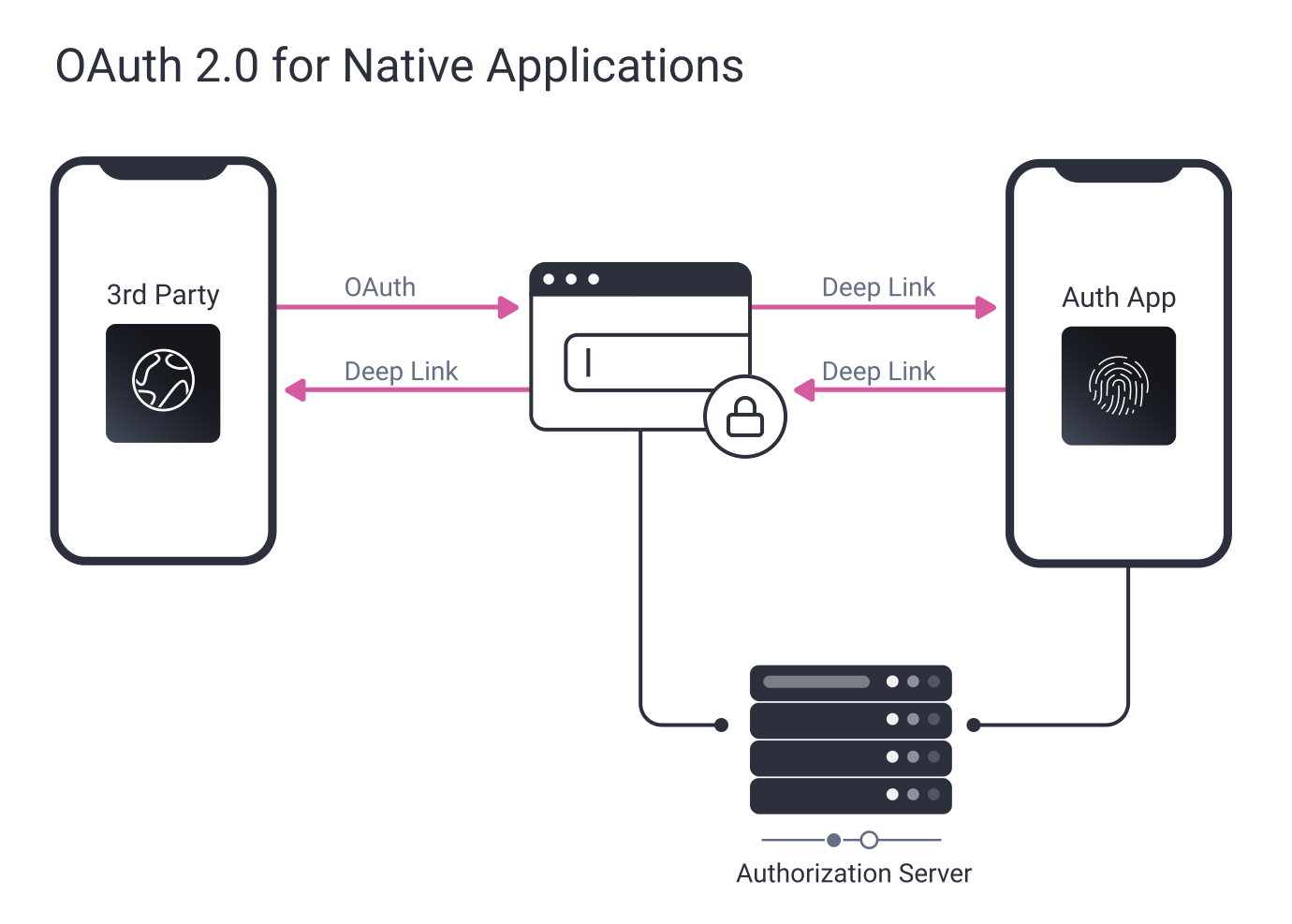
RFC 8252 describes an OAuth flow where a native application or mobile app opens up a browser window and performs the authorization request and user authentication inside it. This allows systems to use a central point of authentication with a standard interface.
Since the authentication happens inside the browser, without the app knowing how it's performed, it allows the server to drive the workflow and select what methods to use to authenticate the user without the app having to know or handle the user authentication. This type of server-driven flow is key to being able to create secure, versatile authentication schemes.
At Curity, we've used OAuth 2.0 for native apps often with our customers, as it enables them to build great authentication workflows. But the need for a browser window is getting some pushback from user experience (UX) designers.
The UX is becoming degraded, especially when using an authenticator app to perform the authentication (as it involves opening a new browser window just to start the authenticator app). After authentication is done, returning to the app via the browser is less than ideal. Since some OS's also add in confirmation dialogs before switching applications, the user experience can become quite poor.
App2App pattern
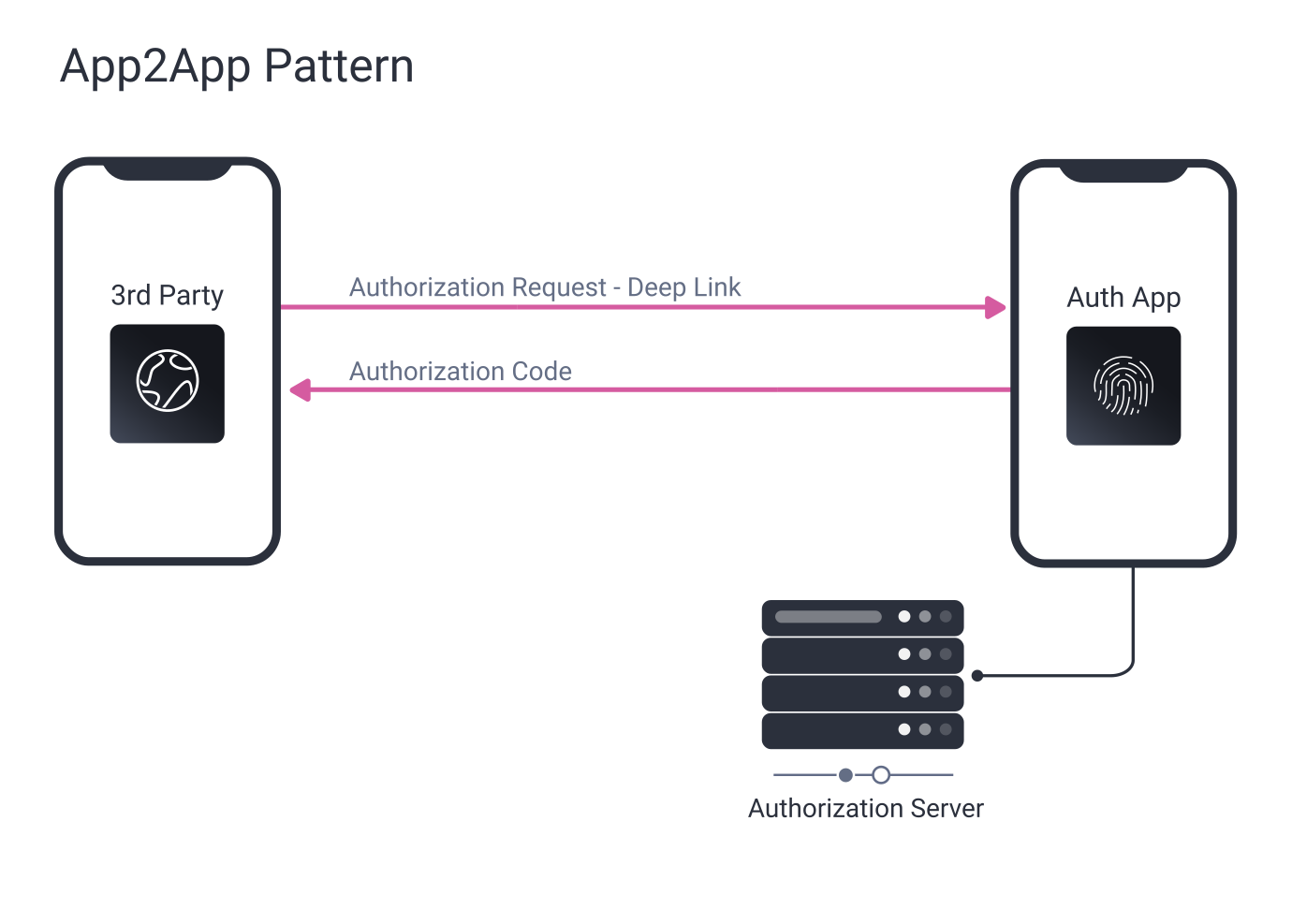
The App2App pattern requires a mobile app to implement the OAuth authorize endpoint, which will be used by the third party to trigger the authenticator app using a deep link. When the authenticator app is triggered, the app proxies the request to the "real" authorization server and performs user authentication using the methods available. This has some UX benefits over the browser method:
No browser component needed:
Since the authenticator app is triggered, it can implement the same authentication methods for the third party as for the first party and can run any type of authentication method.
Standards-based interface for the third party:
The authenticator app will act as the authorize endpoint, which means that the third party can make a regular authorization request without considering that this is even a specific implementation.
However, there are some drawbacks to this solution. This pattern heavily couples the authenticator app to the Authorization Server (AS) since it more or less becomes the authorize endpoint of the AS.
This complicates discovery since clients that shouldn't use the authenticator app for authentication must know to use a different authorize endpoint than the one that triggers the authenticator app. It also affects the possibility of having different brands for the AS. Only one deeplink per domain is allowed, which basically means there has to be a separate AS per domain/brand.
The biggest hurdle with this pattern is that the authentication workflow is coupled to the authenticator app. Since it's the app that implements the authentication, it's hard for the server to change the authentication requirements without having the app change its implementation.
This is partly because the communication protocol between the authenticator app and the AS is undefined. If the app were to use a browser component to implement the authentication, the authentication could still be driven by the server. Still, the UX improvement would be lost and perhaps even degraded since we added an additional app switch.
Hypermedia App2App
Having the server drive the authentication workflow is something I firmly believe is key to making your platform a long-term success. Being able to change and extend authentication methods through configuration rather than releasing new versions of your mobile app saves so much development time.
In addition, the ability to twist and turn the knobs to mitigate threats will make your platform more secure. And, being able to update the way user info is collected during authentication will make it possible to improve your authorization policies for accessing your services gradually. This is the reason I have always defended the use of browser components in mobile apps. And, when we decided to create an authentication API for the Curity Identity Server, this was something we had to solve.
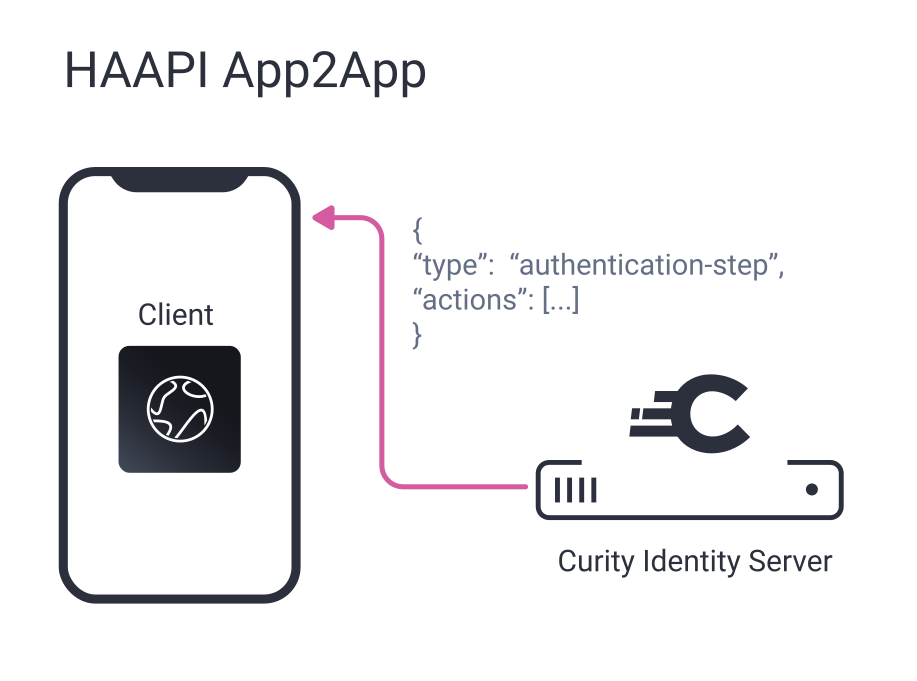
Curity's Hypermedia Authentication API (HAAPI) is a fully-featured authentication server entirely driven by hypermedia. Being hypermedia-driven, all responses contain information on where to go next and what info to collect from the user.
Browserless Login
Secure authentication with Curity's hypermedia API
This makes it possible to create fully automated clients that simply do what the server tells it to do, which also means you can drive the workflow from the server. For example, if you want to add an authentication method, just update the config, and the client will follow suit. The same goes for asking the user for an email address.
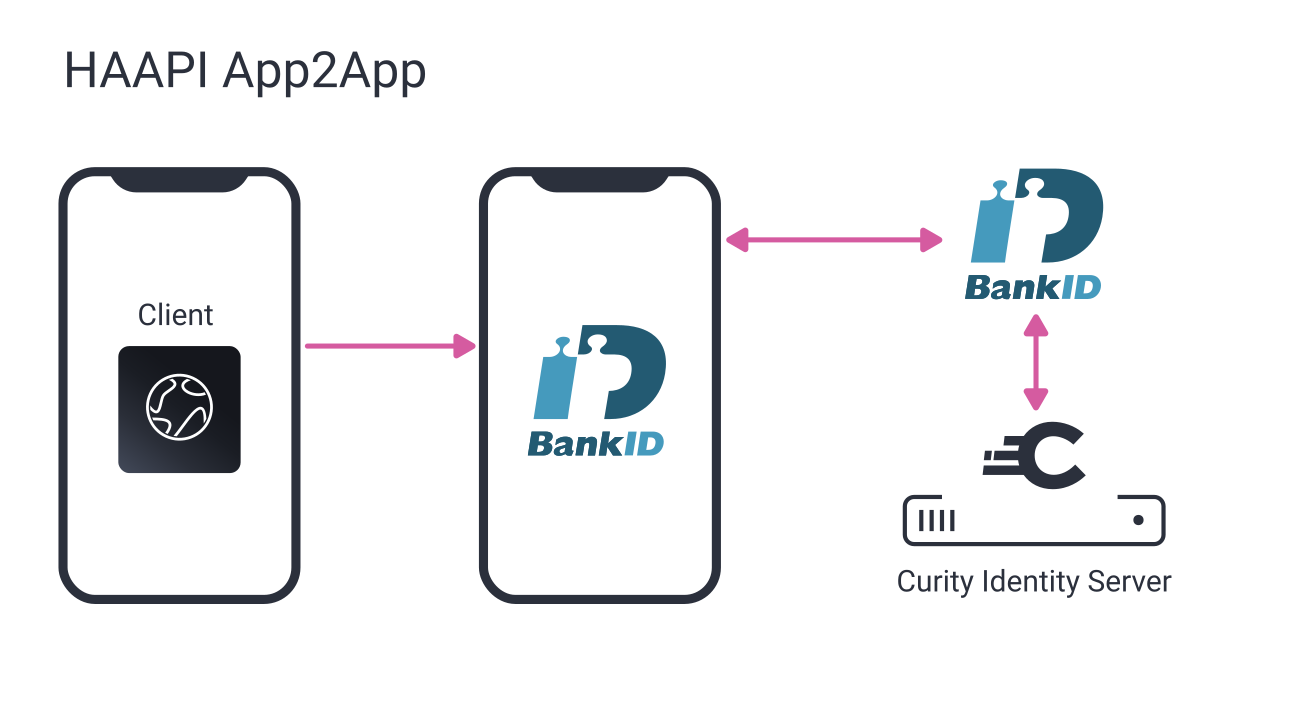
In an App2App scenario, HAAPI can provide information on how to launch the third-party app. For instance, when Swedish BankID is used, the response can contain a deeplink to start the application directly without going through a browser or external app first.
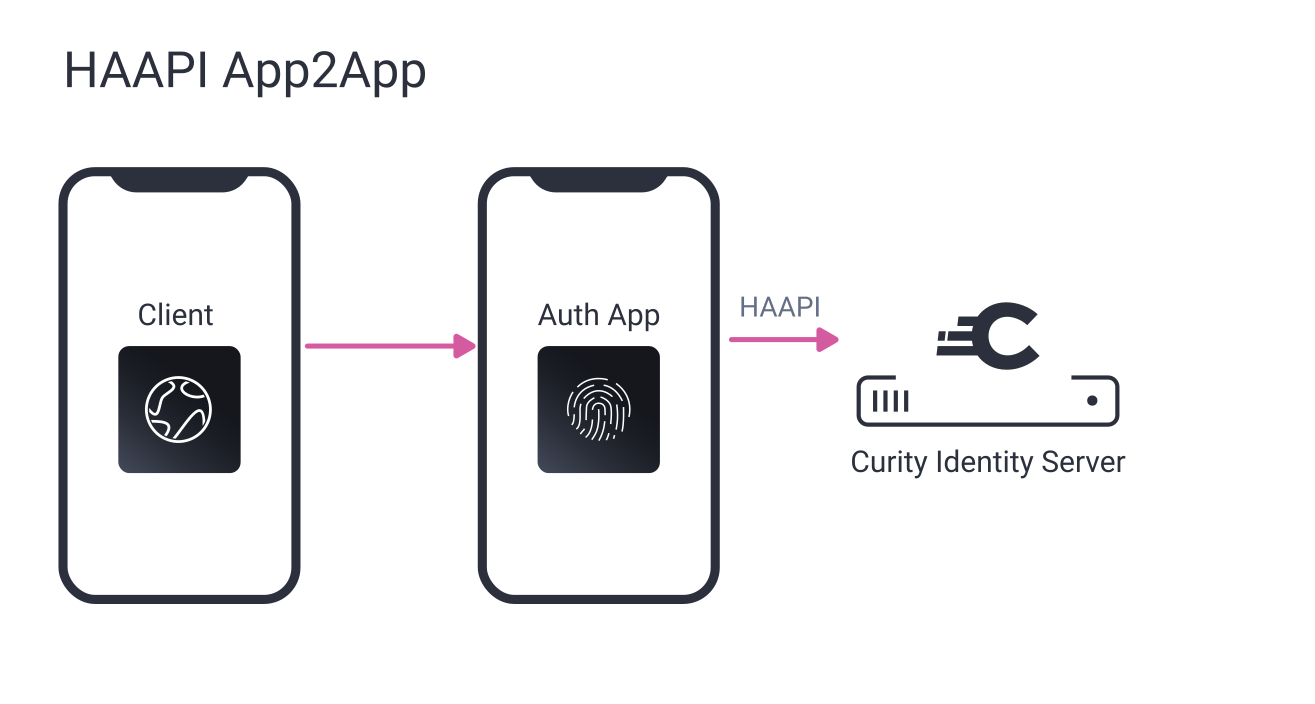
Not only is this good for allowing the server to drive the authentication flow, but it also allows the client to take control over the User Interface (UI). The responses can also contain a list of available authenticators, allowing the user to select which one to use. It also allows the client to decide how the list of authenticators should be presented.
If you don't want a third-party application to have all this power, which in many cases can be sensible, it is possible to keep the App2App patterns authenticator app paradigm. Simply allow the third party to be a HAAPI client, but only allow your bank's authenticator app as an authenticator. In this case, I suggest you have the authenticator app use HAAPI to allow for rich, server-driven authentication workflows.
App2App Login with Authentication Workflows
Watch the webinar on App2App authentication workflows
Client Attestation
Since this kind of API becomes very powerful, it also becomes important to know that the client requesting authentication is the client that was authorized to access the information. Core OAuth authenticates using static client credentials, and in a mobile app world, it is hard to distribute those credentials so that they can be trusted.
HAAPI requires the app to perform an attestation procedure for this purpose to make sure that the app has not been tampered with. This attestation procedure uses frameworks provided by the platform and utilizes app IDs and signing certificates to make sure that this is the trusted application.
Final Thoughts
Authentication is complex, and the requirements are ever-changing. Building mobile apps that implement those requirements can be frustrating if there is a need to make code changes every time something new pops up. By using the Hypermedia Authentication API, most of that complexity can be put in the hands of the Curity Identity Server instead of your developers.
Related resources

Frequently Asked Questions
Is HAAPI a replacement for OAuth 2.0, or does it work alongside it?
HAAPI works alongside OAuth 2.0 rather than replacing it — it governs how the authentication step itself is driven and presented, while OAuth still handles the underlying authorization and token issuance once authentication completes.
Does using HAAPI require rebuilding an existing mobile app from scratch?
No — HAAPI is designed to be integrated into existing native apps via an SDK-style approach, where the app follows the hypermedia responses rather than hardcoding its own authentication logic, so it's typically an integration effort rather than a full rebuild.
What happens if a third-party app doesn't support HAAPI at all?
It would need to fall back to a more traditional integration method, such as the browser-based OAuth flow (RFC 8252), since it wouldn't be able to interpret the hypermedia-driven responses that power the dynamic, server-driven experience.
Can HAAPI be used for authentication methods beyond BankID, like passkeys or biometrics?
Yes — HAAPI is authenticator-agnostic by design, meaning it can support whatever authentication methods are configured on the server, including passkeys, biometric authenticators, or traditional MFA methods, without requiring app-side changes.